


Table of contents: Selecting the time display format ↓ Setting the clock readings ↓
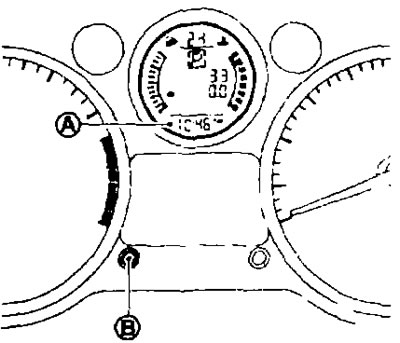
The clock shows the time (A) only when the ignition is on. When the battery cable is disconnected, the display and time format will be reset.
Selecting the time display format
Use the (B) button to switch between 24h or AM/PM formats.
Setting the clock readings
1. Press the knob (B) and hold it for three seconds to enter the hour setting mode.
- At the same time, the numbers showing the hour will start flashing on the display.
2. To set the clock, rotate the regulator (B).
3. Press the knob (B) to enter the minute setting mode.
- At the same time, the numbers showing the minutes will start flashing on the display.
4. To set the minutes, rotate the regulator (B).
5. Press the knob (B) to exit the clock setting mode.
- The second counter will automatically reset to zero and the watch display will stop flashing.
- The set values will be saved if no command is received from the user within 60 seconds.