


Table of contents: Integrated instrument panel control…↓ Checking the instrument panel…↓ Resetting the trip meter ↓ Disassembly and assembly ↓
Integrated instrument panel control unit
- The speedometer, trip meter, tachometer, fuel gauge and coolant temperature gauge are controlled by the integrated instrument panel control unit, which is built into the instrument panel. The integrated control unit receives signals from the integrated air conditioner amplifier and instrument cluster.
- The control and indicator lamps of the instrument panel are controlled by signals coming from the combined amplifier of the air conditioner and instrument panel.
- The total and daily mileage counter is a digital device. The total mileage meter (odometer) data is saved even if the battery leads are disconnected from the battery. Disconnecting the battery cables will clear the trip odometer data.
The coolant temperature gauge shows the temperature of the coolant in the engine.
The tachometer shows the engine speed in revolutions per minute (rpm).
The fuel gauge shows the approximate amount of fuel in the fuel tank.
Checking the instrument panel lighting
When the ignition is turned on, the integrated control unit of the instrument panel turns on the illumination of the scales of the total and daily mileage counter and the variator indicator. When the exterior lighting is turned on, the instrument scales, the total and daily mileage counter, the lighting control switch, and the exterior lighting devices will be illuminated. In addition, when the exterior lighting is turned on, the lighting control switch located on the left side of the instrument panel can be used to adjust the intensity of the instrument panel lighting. The lighting intensity can be adjusted to 16 different levels: from 0 (the pumps are not burning) up to 15 (maximum brightness). When you press the switch, the light intensity will change.
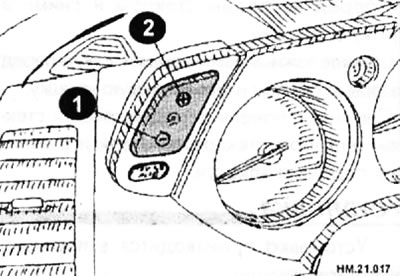
When you press the "minus" (1), the intensity will decrease; when you press the "plus" (2), the intensity will increase.
When the ignition key is turned to the START position, the instrument panel lighting and the lighting control switch are turned off.
Resetting the trip meter
- The vehicle speed signal and memory data from the memory unit circuit are processed by the instrument cluster and displayed as mileage values.
- To reset the trip meter, press the trip meter switch (1) and hold it down for at least 1 second. When the trip meter shows zero, release the switch (1).
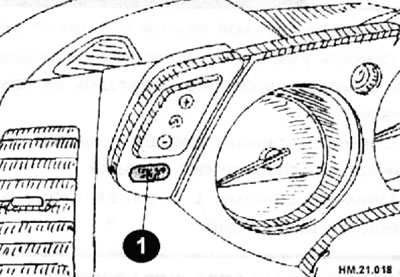
Disassembly and assembly
Instrument panel mounting elements
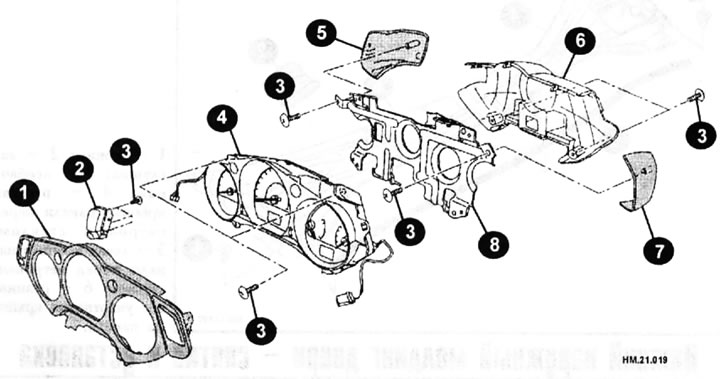
1 — instrument panel cover; 2 - switch for total and daily mileage counter readings and lighting control switch; 3 - screws; 4 — instrument panel assembly; 5 — instrument panel cover (left side); 6 — back cover; 7 — instrument panel cover (right side); 8 — bracket.
- Remove the two mounting screws (Arrows) located on the rear side of the instrument panel rear cover.
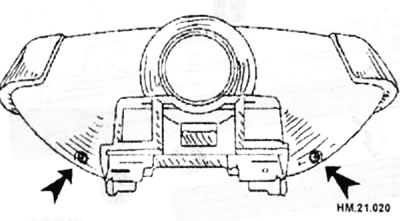
- Disconnect the plugs from the total and daily mileage counters.
- Remove the instrument panel cover.
- Loosen the three mounting screws and remove the light control switch and the trip meter and trip meter switch.
- Unscrew the two mounting screws and remove the instrument panel covers on the right and left.
- Unscrew the two mounting screws and remove the back cover.
- To detach the bracket, release the two tabs and remove the bracket.
- Remove the lamps.
- Assembly is carried out in the reverse order of disassembly.