


Anti-theft system
The audio system is linked to your car's NATS system with a unique code and therefore will not work on any other car. This audio system can only be turned on if the NATS key in the ignition switch is in the ACC or ON position.
Controlling the main functions of the audio system
See the section "All-wave LW MW FM radio receiver with CD player" above.
Radio
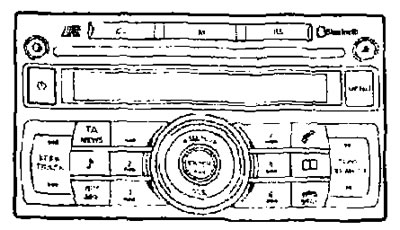
See the section "All-wave LW MW-FM radio with CD player" above.
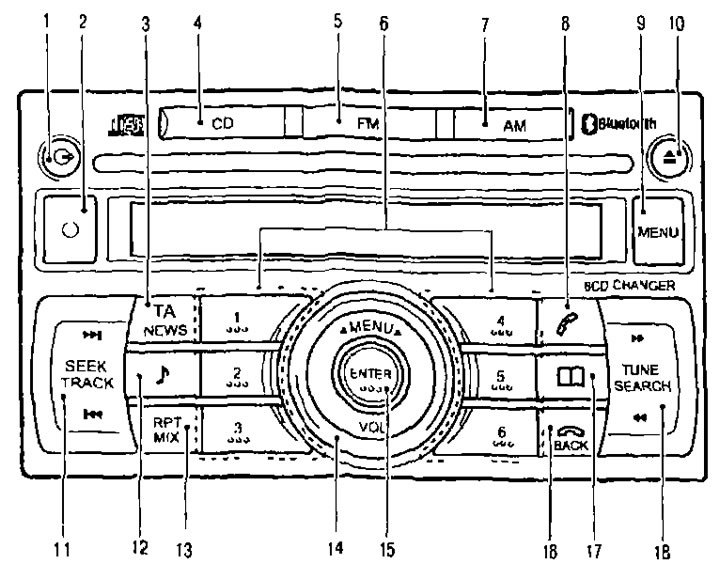
1. CD Load Button; 2. Electrolyte system switch; 3. TA/NEWS button (traffic messages/news); 4. Enable CD playback button; 5. FM band selection button; 6. Preset, radio station and CD selection buttons; 7. AM range selection button; 8. Phone control button; 9. MENU button (call menu); 10. CD eject button; 11. SEEK/TRACK button (search/skip to next track); 12. Sound quality adjustment button; 13. Sequential (RPT) and random (MIX) playback button; 14. MENU/VOL knob (volume control/menu switch); 15. ENTER button; 16. BACK button to end the phone call and return; 17. Phone book call button; 18. TUNE/SEARCH button (setup/search).
CD-Changer
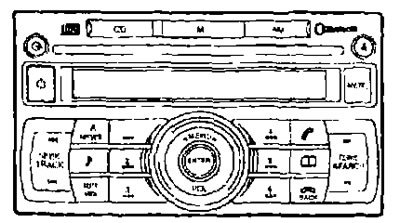
 CD Loading Button
The source is indicated on the page: www.nissanbook.ru
To insert a disc into the CD changer, follow these steps:
- 1. Press the button
 and hold it for no more than 1.5 seconds.
 - 2. Select a free slot in the CD changer magazine by pressing the corresponding disc selection button. If no slot is selected, the CD changer will automatically select the first free slot after five seconds. If there is already another disc in the selected slot, a warning message will appear on the display.
- 3. When the display shows LOAD CD (Load the disk) insert the disc into the slot with the label facing up. The CD will be automatically loaded into the player and will begin playing.
The sequence for loading six CDs into a CD changer is:
- 1. Press the button
 and hold it for more than 1.5 seconds.
 - 2. Insert the CD into the loading slot.
- 3. When the display shows the number of the next loading position, insert a barely moving CD into the loading slot.
After loading the disc, the number of the track being played and the number of the loaded slot will appear on the display.
 Playing CDs
- If the CD button is pressed when the audio system is off and there is a disc in the player, the audio system will turn on and the disc will begin playing.
- If the radio is on, it will automatically turn off and the CD will start playing.

 Fast forward/fast rewind
Pressing and holding the fast forward or fast reverse button will play the disc at high speed. Once the button is released, the player will return to normal playback speed.

 Go to next/previous entry
- After pressing the button once
 skips to the beginning of the next track on the disc. To skip several records, press this button the appropriate number of times. The number of records skipped will be equal to the number of times the button is pressed. After skipping the last track on the disc, the CD player goes back to the first record.
 - When you press the button once
 the player will return to the beginning of the current track of the disc. To go back several tracks, press this button the corresponding number of times. The number of skipped records will be equal to the number of times the button is pressed.
CD Select Buttons
To select one of the six compact discs loaded in the CD changer, press the corresponding disc selection button. Playback of the selected disc starts automatically from the first track.
 Repeat and shuffle button
Pressing this button repeatedly switches the playback modes of the CD in the following order: RPT (REPEAT) TRACK → RPT (REPEAT).
DISC → MIX DISC → MIX ALL → RPT (REPEAT) ALL → RPT (REPEAT) TRACK.
- RPT TRACK: (Repeat playback of the current recording) The player continuously plays the current recording.
- RPT DISC: (Repeat playback of all recordings on a disc) The player plays the current CD repeatedly.
- MIX DISC: (Playing the recordings on the disc s in random order) The player plays all tracks on the selected CD in random order once.
- MIX ALL: (Playing tracks on all discs in random order) the player plays all the tracks on all the discs in random order.
- RPT ALL: (Playing recordings on all discs in sequence) The player plays all tracks on all CDs repeatedly and sequentially.
 CD eject button
If you press and hold this button for less than 1.5 seconds, the current CD will be ejected and the next disc will start playing.
To eject all CDs in sequence, press the button
 and hold for more than 1.5 seconds, the CD changer will start ejecting from the current or last played CD. After the next CD is completely ejected, the next CD will be ejected.
If you do not remove the CD that came out of the player's loading window within 15 seconds after pressing the button, it will be automatically loaded into the player again after a while.
If an error message appears on the display, press the disc eject button
 to eject the faulty CD and try loading another disc, or check if the CD was inserted incorrectly by mistake.
Unloading CDs.
You can also eject all CDs when the ignition key is in the OFF or LOCK position. However, the audio system will not turn on.
In short (less than 1.5 seconds) when you press the button, the selected disc will be ejected from the player.
To eject all discs one by one when the ignition key is in the OFF or LOCK position, press and hold the eject button for more than 1.5 seconds. The CD changer will start ejecting from the current or last played disc. After each disc is completely ejected, the next CD will be ejected.
Note: If you do not remove the CD within 15 seconds after pressing the button, it will be automatically loaded into the player again after a while.
BLUETOOTH interface® to connect a mobile phone (if any)
This system allows you to use your mobile phone in the mode "hands free" ("hands-free"), which increases comfort and safety of movement. For more information, see. "Connecting a mobile phone".