


AM-VHF radio receiver with electronic tuning
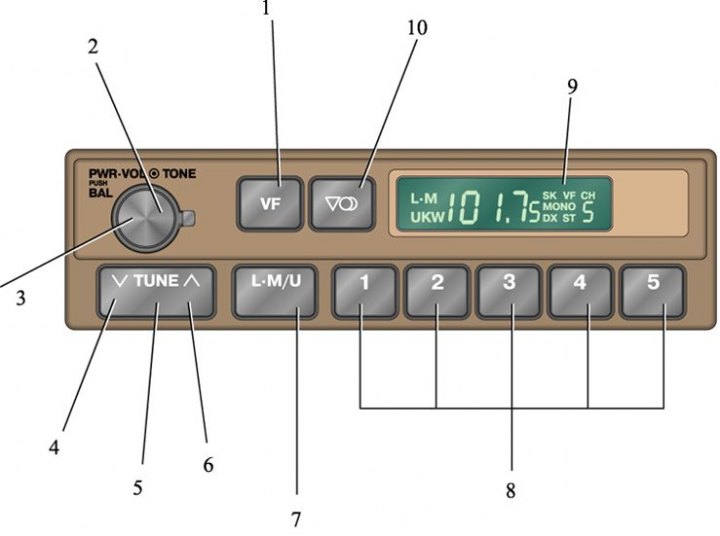
1. Automatic tuning button; 2. Tone control; 3. Handle for turning on the receiver, volume control and balance of the left and right speakers; 4. Tuning with decreasing reception frequency; 5. Settings button; 6. Tuning with increasing reception frequency; 7. Button for selecting AM or FM (VHF) mode; 8. Range selection button; 9. Display; 10. Stereo/Mono selection button
1. Turn on the receiver by turning the "PWR.VOL" knob clockwise.
2. Adjust the volume by turning the "PWR.VOL" knob.
3. Tune to the desired station (see subsection 1.4.2, subsection 1.4.3).
4. To receive a VHF (FM) radio station, switch to the VHF (FM) reception mode, select the stereo or monaural reception mode.
If a transmission is received on VHF stereo, the receiver will automatically switch to stereo reception, and the ST symbol will appear on the display. If the signal is weak, switch to mono mode by pressing the corresponding button. The MONO symbol will appear on the display.
5. Adjust the tone and balance.
6. To turn off the receiver, turn the "PWR.VOL" knob counterclockwise.
Data taken from this portal: nissanbook.ru
Setting the tone
The tone is adjusted by turning the TONE knob.
Setting up balance
To adjust the balance, pull the PWR.VOL knob towards you and turn it.