


Table of contents: Tone control ↓ Balance adjustment ↓
Receiver
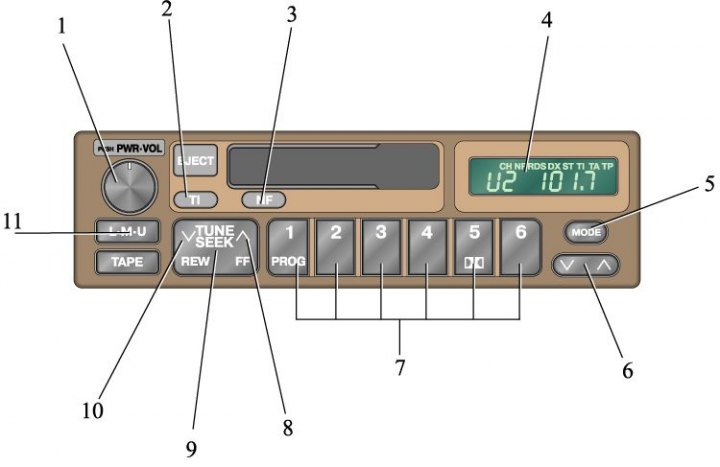
1. Volume control knob; 2. Button for setting up the receiver and selecting TI mode (reception of traffic information); 3. NF button for automatic search of RDS system across the entire network broadcasting range; 4. Display; 5. Tone or balance adjustment selection button 6. Tone or balance adjustment button; 7. Station selection buttons; 8. Side of the up-tuning button; 9. Button for tuning to a station; 10. Down-tuning button side; 11. Button for turning on the receiver and selecting AM or VHF
Cassette player
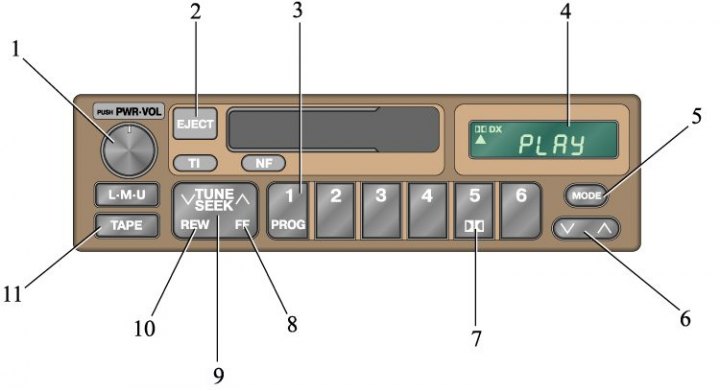
1. Volume control knob; 2. Button for stopping and removing the cassette; 3. Tape side selection button for playback; 4. Display; 5. Tone or balance adjustment selection button; 6. Tone or balance adjustment button; 7. Dolby Noise Suppressor Button; 8. Button side for fast forward; 9. Button for rewinding the cassette in both directions; 10. Rewind button side; 11. Player power button
1. Turn on the receiver by pressing the LMU button, select stereo or monaural reception mode, or press the TI button to receive a traffic information station (see subsection 1.5.4). The display will show L, M or U. The receiver can also be turned on by pressing the "PWR.VOL" knob.
(See the original on the resource: «NISSANBOOK»)
2. Adjust the volume by turning the "PWR.VOL" knob.
3. Tune to the desired station (see subsection 1.5.2, subsection 1.5.3).
4. When tuning to a VHF station, the receiver will automatically switch to stereo reception mode. The ST symbol will appear on the display. If the signal is weak, the reception band will be automatically narrowed to reduce noise. If the signal is very weak, the receiver will automatically switch to mono reception mode.
5. Adjust the tone and balance.
6. To turn off the receiver, press the "PWR.VOL" knob.
Tone control
1. To adjust the bass response, press the MODE button several times until BASS 0 appears on the display. Then press the level button on either side and set the desired tone. The adjustment range is from BASS –10 to BASS +10, and the tone level is displayed on the display.
2. To adjust the high frequency playback, press the MODE button several times until TREB 0 appears on the display. Then press the level button on either side and set the desired tone. The adjustment range is from TREB –10 to TREB +10, the tone level is displayed on the display.
Balance adjustment
Two speakers
1. Press the MODE button repeatedly until BAL 0 appears on the display. Then press the level button on either side and adjust the balance as desired. The balance adjustment range for the left and right speakers is from BAL L14 to BAL R14, and the balance level is displayed on the display.
Four speakers
2. To adjust the balance between the left and right speakers, press the MODE button several times until BAL 0 appears on the display. Then press the level button on either side and set the desired balance. The balance adjustment range is from BAL L14 to BAL +R14, the balance level is displayed on the display.
3. To adjust the balance between the front and rear speakers, press the MODE button several times until FADE O appears on the display. Then press the level button on either side and set the desired balance. The front and rear speaker balance adjustment range is from FADE F14 to FADE R14, and the balance level is displayed on the display.