


Table of contents: Anti-theft system ↓ Removal the audio system lock ↓ Turning the audio system on/off ↓ Adjusting the sound volume ↓ Selecting the language of messages ↓ Mode switch ↓ Sound settings ↓ Adjusting the low frequencies (bass) ↓ Adjusting the treble (treble) ↓ Adjusting left and right speakers…↓ Adjusting the balance of the front…↓ EFFECT (acoustic effects) ↓ Remembering the sound settings ↓
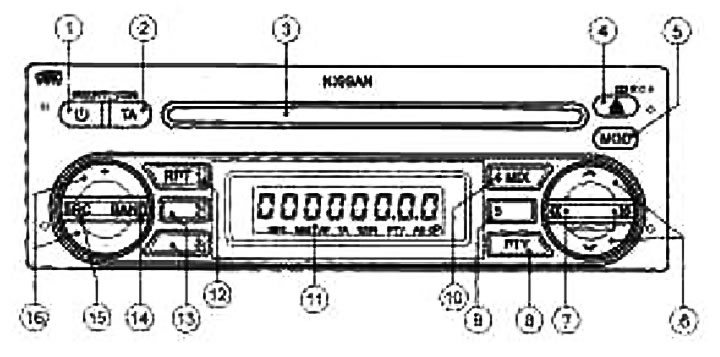
1. Power switch; 2. Switch for listening to traffic service announcements (TA); 3. CD loading slot; 4. CD eject button; 5. Audio system volume adjustment button (MOD); 6. Manual tuning of the radio receiver, selecting the "Audio" mode; 7. Search radio station frequencies, search CD records in both directions or fast forward in both directions; 8. Radio program type selection button (PTY); 9. Preset button; 10. Preset radio station selection button/Random sequence playback switch; 11. Display; 12. Preset radio station selection button/repeat playback mode switch; 13. Pre-programmed radio station selection buttons; 14. Radio band switch LW, MW, FM; 15. Mode switch; 16. Volume control
This system is a radio with electronic tuning of LW-MW-FM ranges with a CD player, anti-theft system and traffic alert function.
Anti-theft system
Having an individual four-digit code that is known only to the owner of the car significantly reduces the risk of theft of the audio system. Without knowledge of the individual code, it will be impossible to use the audio system after installation in another car. During normal operation, the audio system is unlocked and can be used in the usual way.
Removal the audio system lock
When the audio system is disconnected from the vehicle's electrical network, the device's ability to turn on is blocked.
When the on-board power supply is subsequently connected and the audio system is turned on, the message "CODE" is displayed on the display for three seconds.
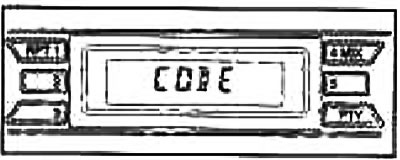
To unlock the audio system, you must enter a unique four-digit code. The code is entered using the buttons for selecting pre-programmed radio stations.
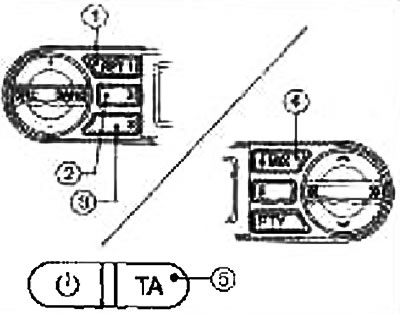
1. Press the first preset radio station selection button the number of times corresponding to the first digit of the individual code
For example, the code entered is 5169. The first position of the code is 5. Therefore, press the first preset radio station selection button five times in a row.
2. The second, third and fourth digits of the code are entered in the same way using the 2nd (once), 3rd (six times) and 4th digits respectively (nine times) buttons for selecting pre-programmed radio stations.
3. Press the TA button ⑤ to confirm the input. If the entered code is correct, the audio system will be ready for operation.
If the wrong code is entered three times in succession, "ERROR" will appear on the display for 3 seconds, then "WAIT 1 HR" will appear (wait one hour). Accordingly, the audio system will be blocked for an hour. After that, you can try to enter the correct code again.
Turning the audio system on/off
Power switch
Turn the ignition key to the ACC or ON position, then press the power switch Ⓘ. However, if the audio system is turned off after the ignition is turned off, it will turn on after the ignition is turned on. The audio system will start working in the same mode (receiving a radio station or playing a CD) and at the same volume level as immediately before the power was turned off.
To turn off the audio system, press the power switch Ⓘ or turn off the ignition (oFF or LOCK position).
Adjusting the sound volume
By pressing the "+" or "-" buttons on the regulator, set the desired volume level.
Selecting the language of messages
[The text was borrowed from here: nissanbook.ru]
To enter the language selection mode:
- 1. Make sure the audio system is turned off
- 2. Press and hold buttons ① and ④ simultaneously.
- 3. Press the Ⓘ button to turn on the audio system.
- 4. Release all buttons and the display will show "LANGUAGE"
- 5, Press the button << or >>, the display will change the language names in the order shown below: ENGLISH → FRENCH → GERMAN → ITALIAN → DUTCH → SPANISH → POLISH → ENGLISH
After selecting the display language, turn the audio system off and then back on using the power button.
Mode switch 
This switch allows you to select the source of the program being played: radio or CD player. Each time you press the switch, the display shows the active operating mode
Sound settings 
By pressing the "MOD" button briefly, select the sound settings menu. By pressing the button in succession,
 or
or  the modes are switched in the order specified below.
BASS (low frequencies) → TREBLE (high frequencies) → BALANCE (left and right speaker balance) → FADER (front/Rear Speaker Balance) → EFFECT (acoustic effects) → BASS (low frequencies)
After adjusting the sound, press the "MOD" button again to exit the menu. You can also wait 10 seconds without pressing any buttons to exit the menu.
Adjusting the low frequencies (bass)
Use this mode to boost or cut the low frequency components of the audio signal.
Turn on the bass level adjustment mode and press the buttons << or >>, set the desired bass level.
Adjusting the treble (treble)
Use this mode to boost or cut high frequency components of the audio signal.
Turn on the high frequency level adjustment mode and, by pressing the buttons << or >>, set the desired high frequency level.
Adjusting left and right speakers (balance)
Use this mode to set the volume balance between the left and right speakers.
Turn on the balance adjustment mode and press the buttons << or >>, set the desired balance between the right and left sides.
Adjusting the balance of the front and rear speakers (fader).
Use this mode to set the volume balance between the front and rear speakers.
Turn on the balance adjustment mode and press the buttons << or >>, set the desired balance between the front and rear speakers.
| Sound settings mode | Position of buttons | ||
| << | Central position | >> | |
| BASS (low frequency level) | BASS -7 | BASS 0 | BASS +7 |
| TREBLE (high frequency level) | TREB -7 | TREB 0 | TREB +7 |
| BALANCE (balance between right and left speakers) | BAL-9 (the balance is shifted to the left) | BAL 0 | BAL+9 (the balance is shifted to the right) |
| FADER (balance between front and rear speakers) | FADER -9 (the balance has shifted back) | FAD 0 | FADER +9 (the balance is shifted forward) |
EFFECT (acoustic effects)
Use this mode to set the acoustic effect.
By pressing buttons << or >>, You can change the effects in the following order:
OFF (no effects) → ENHANCE (rich sound) → ACOUSTIC (hall acoustics) → LIVE (live sound).
When any effect is selected, the "EQ" indicator lights up, which goes out after the mode is turned off
Remembering the sound settings
When switching the type of work (radio receiver, compact disc player) those sound settings are set (bass and treble levels and acoustic effect), which were previously set for the corresponding playback source. The balance settings do not depend on the playback source.