


Table of contents: "CD" button ↓ CD Load Button ↓ ①②③④⑤⑥ CD Selection Keys ↓ Rewind keys "FF, REW" (in the…↓ Rewind keys "FF, REW" (in the…↓ CD Recording Search Key (in the…↓ CD Recording Search Key (in the…↓ Repeat playback key for recordings ↓ Random playback button ↓ CD Eject Button "CD EJECT" ↓ Recommendations for using the…↓ Audio controls located on the…↓ Collaboration with a mobile phone…↓
Pressing the CD button while the audio system is on turns on the multi-disc CD player (CD changer) and playback of the CD track that was playing before the audio system was last turned off begins.
If a CD is loaded while the radio is playing, the radio program will automatically stop and the CD will start playing.
If the audio system is turned off while a CD is playing, the next time the audio system power button is pressed, the CD will resume playing.
 "CD" button
If there is a CD in the player and you are listening to a radio broadcast, pressing the "CD" button automatically turns off the radio and switches to playing the CD.
 CD Load Button
To load a disc into the CD changer, press the "LOAD" button. Select a free space by pressing the corresponding disc location key. Insert the CD into the loading slot with the working side down. The display should show "LOAD CD". The CD will be automatically loaded into the player and playback will begin. If the given space is already occupied by another CD, a corresponding message will appear on the display.
After loading the disc, the number of the track being played and the number of the active location will appear on the display.
If a disc is not loaded within 10 seconds after pressing the load button, the loading slot will automatically close and the previous disc or radio program will continue playing.
①②③④⑤⑥ CD Selection Keys
To select one of the six CDs loaded in the multi-disc player, press the corresponding disc selection key. Playback of the selected disc starts automatically from the first track.

 Rewind keys "FF, REW" (in the forward and reverse direction) - version A
In case of long-term (not less than 2 sec) pressing the button
(fast rewind) or (fast forward). You will be able to fast-forward the CD. Once the button is released, the player will return to normal playback speed.

 Rewind keys "FF, REW" (in the forward and reverse direction) - version B
When you press the button
and you will be able to fast-forward the CD. Once you release the button, the player will return to normal playback speed.
CD Recording Search Key (in the forward and reverse direction) - version A
Press the button briefly
to go to the beginning of the current track on the CD. To skip multiple tracks, press several times. The number of missed entries will be equal to the number of times the button is pressed.
Click on the button
to skip to the beginning of the next track on the CD. Press the button several times ,
to skip several tracks on a CD. The number of tracks skipped will be equal to the number of times you press the button (skipping
[The text was copied from the portal www.NISSANBOOK.ru] the last track of the disc, the system goes back to the first record).
CD Recording Search Key (in the forward and reverse direction) - version B
By pressing the button briefly
, there is a transition to the beginning of the current record, and when you briefly press the button - jump to the beginning of the next record. To quickly jump between tracks on the disc forward or backward, hold down the pressed key until you reach the desired record, and then release the button (after finishing the transition to the last track, the first track of the disc will be played)
 Repeat playback key for recordings
By pressing the "RPT" button in succession, the playback modes of CD recordings are switched in the following order:
REPEAT TRACK → REPEAT DISC → REPEAT OFF → REPEAT TRACK
REPEAT TRACK: The player plays the same track continuously.
REPEAT DISC: The player repeats playback of the selected disc.
 Random playback button
By pressing the "MIX" button in succession, the playback modes of the recordings are switched cDs in the following order: MIX DISC → MIX ALL → MIX OFF → MIX DISC
MIX ALL: Play all tracks on all CDs in random order
MIX DISC: Plays all recordings on the currently playing CD in random sequence. When all recordings of this disc are finished playing, the next disc is played back.
 CD Eject Button "CD EJECT"
By briefly pressing the "EJECT" button (
) after pressing the place selection button, the corresponding CD is ejected from the player.
To eject all the CDs loaded into the player in sequence, first press the "EJECT" button, wait for the message "SELECT A CD", then press and hold the "EJECT" button again for at least one and a half seconds. The multi-disc player starts with the last disc being played.
After extraction, the next disk is issued.
If you do not remove the CD that came out of the player's boot slot after pressing the button within 15 seconds, it will automatically be loaded back into the player after a while.
If the ignition switch is in the OFF or LOCK position, or if the audio system is turned off, you can eject the last CD that was played. However, the audio system will not turn on automatically. When the following message appears on the display, press the "EJECT" button to eject the disc:
The display alternately shows the message "CD ERROR" (cD player error) and "EJECT CD" (remove the CD). You should remove the CD, replace it with another one, or check whether the disc was loaded with the working side facing up by mistake.
Recommendations for using the service functions of the audio system
| Setting modes | Explanations | |
| How to prevent radio receiver retuning? | "AF" function: ON.; "AEG" function: ON.; "TA" function: OFF.; PTY function: OFF. | With this setting of service functions, the radio will maintain the setting as long as there is sufficient radio signal. Reception of traffic announcements and "PTY" type radio program data is not possible. |
| How to ensure the best radio reception quality (with possible retuning of the radio receiver)? | "AF" function: ON.; "REG" function: OFF. | With this service function setting, the radio will automatically re-tune to the radio station with the strongest signal, providing the best radio reception quality. |
| How to choose a radio program of your favorite genre? | "PTY" function: ON. | With this setting of service functions you can select a radio program of a certain genre. |
| How to receive traffic messages? | Function "TA": ON. | With this service function setting, the radio will automatically switch to a station that broadcasts traffic announcements. |
Audio controls located on the steering wheel (if any)
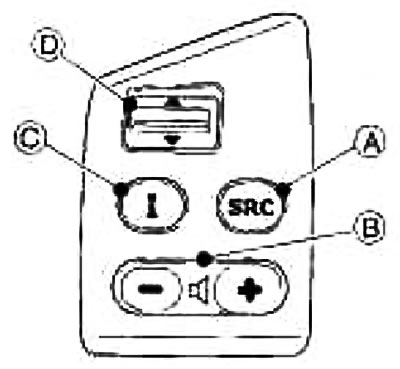
Ⓐ SRC button (job type switch)
Ⓑ Volume control (VOL)
© INFO button (information)
Ⓓ Automatic radio tuning/CD search buttons
The buttons located on the steering wheel allow you to control the main functions of the audio system.
To activate the steering wheel controls, turn the ignition key to the ACC or ON position and turn on the audio system power
 Steering wheel mode switch
Successive presses of the "SRC" button result in switching between the audio system operating modes:
Radio receiver → multi-disc player → radio receiver
 Sound volume control
To adjust the sound volume, press the "+" or "-" buttons
ⓘ button
For more information, see "Dashboard and controls" above
▲, ▼ Search switch
Changing pre-programmed stations (radio receiver mode). By pressing and holding the ▲ or ▼ button for at least 1.5 seconds, you can switch between pre-programmed stations.
Search mode (radio receiver mode).By holding down the ▲ or ▼ button for at least 1.5 seconds, you can turn on automatic search for the next or previous station.
Changing records (cD player mode). By pressing the ▲ or ▼ buttons for no longer than 1.5 seconds, you can go to the next record or return to the beginning of the current one. Several presses of these buttons will allow you to skip several records or go back several records.
Fast forward or reverse playback (cD player mode). By holding down the ▲ or ▼ button for at least 1.5 seconds, you can fast forward or reverse the recording.
Collaboration with a mobile phone (if any)
Your car's audio system is equipped with an interface for installing the system "Hands Free" (free hands). For more information, please contact your authorized NISSAN dealer.
When making or receiving phone calls, the radio or music being listened to will automatically stop playing and the voice of the telephone subscriber will be transmitted through the speaker. The message "PHONE" (phone) will appear on the display of the audio system.
At the end of the telephone conversation, the audio system returns to its previous mode.