


Table of contents: Radio Data System (RDS) ↓ "TA" function for receiving traffic…↓ Selecting a radio program type ↓ Personal settings menu ↓
Radio Band Switch
Each short press of the "BAND" button switches radio bands in the following order: FM1 → FM2 → FMT → MW → LW → FM1
If you select the FM range and continue to (not less than 2 seconds) press the "BAND" button, the automatic programming function of the radio receiver's memory will be activated. The radio receiver will automatically find five FM stations with the strongest signal and enter their frequencies into the memory cells (from first to fifth) storage device (fMT range). During automatic programming of the radio's memory, the display shows "AS-STORE" and the "AS" symbol appears, and the sound is muted.

 Manual tuning to radio stations
To tune into radio stations manually, use these buttons. The tuning frequency increases when you press the button
and decreases when you press the button
If any of these buttons is held for more than 0.5 seconds, the tuning frequency will change continuously within the set frequency range until the button is released.
The frequency changes in steps of 100 kHz in the FM range, 9 kHz in the MW range and 3 kHz in the LW range.
> Search radio stations
"SEEK" button (<< and >>) is designed to search for the nearest radio station whose frequency is higher or lower than the current tuning frequency.
When you press the side once >> buttons the tuning frequency increases until the nearest radio station of the given range is found. During the station search the sound is muted.
When you press the side once << buttons the tuning frequency decreases until the nearest radio station of the given range is found. During the station search the sound is muted.
If the radio station is not found when changing the frequency to the end of the range, it returns to the tuning frequency that was set before the search began.
①②③④⑤ Fixed Setting Buttons
Short term (no longer than 2 seconds) press a preset button to select the station broadcast that the button is tuned to.
To store the station currently tuned to the radio, select the preset button and press and hold it for more than 2 seconds.
- You can preset up to 15 stations in FM bands (5 stations in the FM1, FM2 and FMT sub-ranges)
- You can also preset up to 5 stations in MW and LW bands.
Radio Data System (RDS)
The RDS radio data system allows additional information to be transmitted simultaneously with the main FM radio signal in encoded digital form. The RDS system supports many information service functions, such as displaying the name of the radio station, receiving traffic reports and local news, and automatically searching for a radio station broadcasting a program of a certain genre.
Note: Some RDS service functions may not be available in some countries or regions.
Alternative Radio Frequencies (AF)
The "AF" function for selecting alternative radio frequencies can work in the FM radio band and also when playing CD recordings (if the system previously operated in the FM range)
If the "AF" function is activated using the custom setting menu (oN position - turned on), then the display shows "AF" After the "AF" function is turned on, the following service functions are performed:
1. Automatic radio tuning function. The radio receiver, comparing the power of radio signals on all alternative frequencies, automatically selects and tunes to the broadcast frequency that provides the best conditions for receiving a radio broadcast
2. EON Extended Network Data Update(This function also works when the "AF" function is switched off). Reception of EON data allows the frequencies of pre-programmed stations to be automatically retuned to the same radio network. In addition, it becomes possible to use additional service functions provided by the network, such as receiving traffic announcements. When the radio is tuned to an RDS station included in the extended EON network, the "EON" indicator lights up on the display.
3. "PS" function for displaying the name of the radio station. Once the radio is tuned to an RDS radio station (manually or semi-automatically), RDS radio data reception begins and the name of the received station is immediately displayed on the display.
4. Function of interrupting the current mode by an alarm signal [ALARM INTERRUPTION - EBU (European Broadcasting Union) SPEC FOR INFO]. If the radio receives the alarm code "PTY 31", the current operation mode of the CD receiver is automatically interrupted and the message is broadcast with the "ALARM" indicator on the display. After the warning message ends, the audio system will immediately return to the original operation mode.
5. Mode - "REG" for receiving local radio stations. If you turn on the "REG" mode when the radio is operating in the FM range and is tuned to a local radio station broadcasting local programs, the radio setting will be saved and switching to other local radio stations will occur.
"TA" function for receiving traffic messages
This function can be used in the FM range when the radio is operating, as well as when playing CD recordings.
The "TA" function is activated by pressing the "TA" button. After this function is activated, the display shows "TA".
When you press the "TA" button again, this mode is disabled and the "TA" indication disappears from the display!
If the "TA" function is off and the station to which the radio receiver is tuned transmits traffic announcements, the display will show "TA". When you press the "TA" switch and turn on the traffic announcement function, the display will show "TA" instead of "TA".
Function of interrupting the current mode by a traffic message
If the "TA" function is turned on, the radio receiver, having detected the broadcast of a traffic announcement, tunes to the radio station that is broadcasting this announcement, and the sound volume is set to a preset level. The word "TRAFFIC" appears on the display (road communication) and the "TA" indicator flashes.
After the traffic announcement has finished, the audio system returns to the initial operating mode it was in when the traffic announcement was interrupted. The volume level is also set to the initial level. The reception of a radio program of a station included in the extended EON network is automatically interrupted if a traffic announcement is also being transmitted by an EON radio station.
The traffic announcement interruption function is cancelled if one of the "TA", "BAND" or "SRC" buttons is pressed during the traffic announcement broadcast. The "TA" function returns to the standby mode.
Setting the volume level for traffic announcements
You can preset the volume level for traffic announcements using the personal settings menu.
Note: The "TA" mode works regardless of whether the "AF" mode is turned on
 Selecting a radio program type
The "PTY" function allows you to select a radio station broadcasting a program of a certain genre.
This function is not available if the radio is operating in the MW or LW range.
The "PTY" function, when turned off, is turned on by pressing the "PTY" button when the radio is in the FM range. Pressing the "PTY" button again turns off this mode.
When the "PTY" function is on, the display shows "PTY"
1. PTY radio program type selection mode
The selection of the PTY type of radio program is made using the buttons <<, >> or
 and
and  manual tuning of the receiver.
The source of the article is on the website nissanbook.ru
NEWS (News) → SPORT (Sports) → VARIED (Various programs) → POP M (Popular music) → AFFAIRS (Business news) → CLASSIC (Classical music) → NEWS
If no button is pressed within 10 seconds (or the BAND button is pressed briefly), there is an automatic exit from the "PTY" menu
2. Radio program search function by "PTY" type
Note: When the PTY mode is on, only stations of the program type that were selected when the PTY mode was active are tuned in.
The function of searching for a radio program by a given "PTY" type is activated by pressing one of the automatic tuning buttons of the radio receiver (<< or >>). During the search for a radio program of the specified "PTY" type, the display periodically shows the message "SEARCH" and the name of the specified "PTY" type of radio program.
If the desired radio program cannot be detected, the display shows the message "NO MOUTH" for 3 seconds. Then the radio receiver will continue to receive the program of the radio station to which it was previously tuned.
If the radio receiver is tuned to a station that is broadcasting a program of the specified "PTY" type, the name of this radio station will appear flashing on the display.
If you want to find another radio station with this type of program, you can:
- Double-click the search button in one direction or the other
- Press the "PTY" button, then the search button in one direction or the other.
3. "PTY" mode - waiting
The "PTY" standby mode can be switched on when the radio receiver is operating in the FM range, as well as when the CD player is operating.
A short sound signal warns of an interruption in the "PTY" mode. The display shows the name of the "PTY" type of radio program for 2 seconds if the radio receiver detects the "PTY" code. Then the display shows the name of the "PTY" type of the interrupting station, and the "PTY" indicator flashes.
The "PTY" standby mode is switched off by pressing the "PTY" button. At the same time, the "PTY" indicator on the display will go out.
4. "PTY" interrupt mode
If you press the "PTY" button in the "PTY" interrupt mode, the audio system will return to the original playback source. However, the "PTY" standby mode will remain active.
Personal settings menu
To enter the personal settings menu while the radio is on, press the "MOD" switch and hold it down for at least 2 seconds
If you press the button
and then the display will sequentially change the indications of the installation modes:
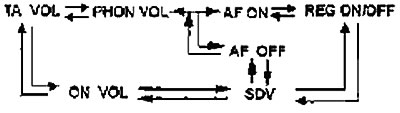
- Using the buttons "+", "-", << and >> set the required volume level for traffic announcements (TA VOL).
- Using the buttons "+", "-", << and >> set the desired volume level for your mobile phone (PHON VOL).
- Using the buttons << and >> turn the Alternative Frequency (AF) function on or off. When the received signal weakens, the radio will automatically switch to a frequency with a stronger signal
- Using the buttons << and >> turn on or off the local radio reception mode (REG). In this mode, the radio will receive programs from local radio stations.
- Use the "and" buttons to turn on or off the "SDV" mode of automatic volume control depending on the speed of the car. When the "SDV" mode is on, the volume will change in accordance with the speed of the car.
- Using the buttons "+", "-", << and >> set the desired volume level, which is set by default when the audio system is turned on (ON VOL). This way, the maximum volume is set each time the audio system is turned on. However, it should be noted that if you lower the volume before turning off the audio system, then the volume will have the new set value when you turn it on again.
Note: If the "AF" function is disabled, the "REG" mode is not available. If the "REG" mode is disabled, the message "REG OFF" (the "REG" mode is disabled) appears on the display for 3 seconds after turning on the audio system.
After you have finished adjusting the volume levels, save the adjustments by pressing the "MOD" button or by not pressing any buttons for 10 seconds.