


Table of contents: Adjusting the sound level, tone and…↓ Listening to radio broadcasts ↓ Listening to a tape recorder ↓
Adjusting the sound level, tone and balance
Volume control
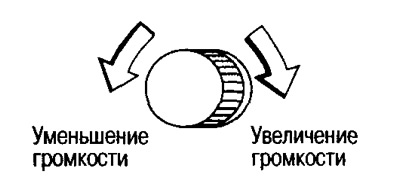
The sound volume is adjusted by rotating knob A.
Adjusting tone and balance
The setting mode is switched using the B SOUND button. Each time this button is pressed, a sound signal is heard and the setting mode is switched in the following sequence:
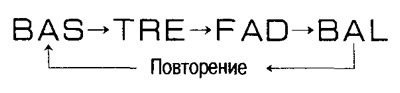
Note: If control is interrupted for 10 seconds or more during the adjustment process, the system automatically returns to its original state.
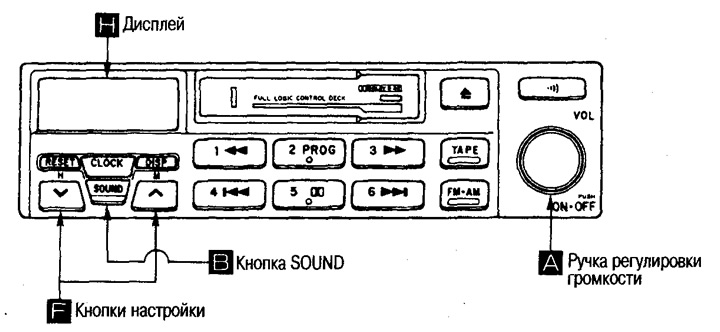
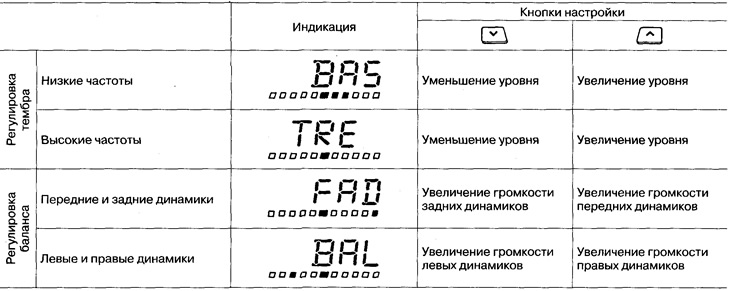
In each mode, adjustments are made by pressing the F setting buttons.
* The icon is displayed during setup
Listening to radio broadcasts
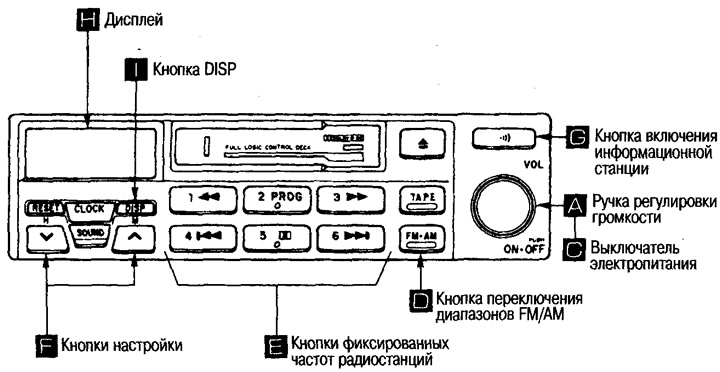
1. Turn on the power supply.
Turn the ignition key to the Ace or ON position and press the FM/AM switch D or the power switch C.
2. Select the desired broadcast range.
Press the D button to switch the FM/AM broadcast range. Each press switches from FM to AM and vice versa (the display will show the selected FM or AM band).
3. Select the desired radio station.
To select a radio station previously stored in memory, press one of the E buttons (the display will show "ch" and the number of the pressed button).
To listen to radio stations not stored in memory, press one of the F tuning buttons (the display will show the frequency of the received radio station).
To turn off the radio, press button C.
Note: After removing the battery, previously recorded radio frequencies are erased from the memory, so you must re-enter the frequencies of the desired radio stations into the memory.
Turning on the information station
Press button G to turn on the information station. To turn off this station, press the button again.
Note: The information station operates on 1620 kHz in AM mode and is stored in the radio receiver's memory.
Tuning to a radio station
Pressing the F buttons changes the radio reception frequency, L - the reception frequency increases V - the reception frequency decreases
Automatic setup
If you press the F button of the A or V setting until a beep appears, the frequency will change until a radio station is received.
Manual setting
If you briefly press one of the F setting buttons (A or V), the reception frequency will change while you hold the button.
Note: If the received signal is weak and you are unable to tune to a radio station automatically, tune to that station manually.
Entering the radio station reception frequency into memory
Tune to the station whose frequency you want to enter into memory, press one of the E memory buttons (1-6) and hold it until a beep sounds (the display will show "ch" and the button number).
Note:
With one button you can enter one radio station each from AM and FM range.
After removing the battery, the data stored in the memory is erased. After replacing the battery, enter the radio frequencies into the memory again.
Display indication H
The display shows the frequency of the received radio station, as well as the following information:
- AM: receives AM signal
- FM: receive FM signal
- ST: FM stereo reception (with good sensitivity)
- ch: memory button number
Determining the frequency of the received radio station
If you press the I DISP button (change of indication), the display of the frequency of the received radio station and the current time will switch.
Listening to a tape recorder
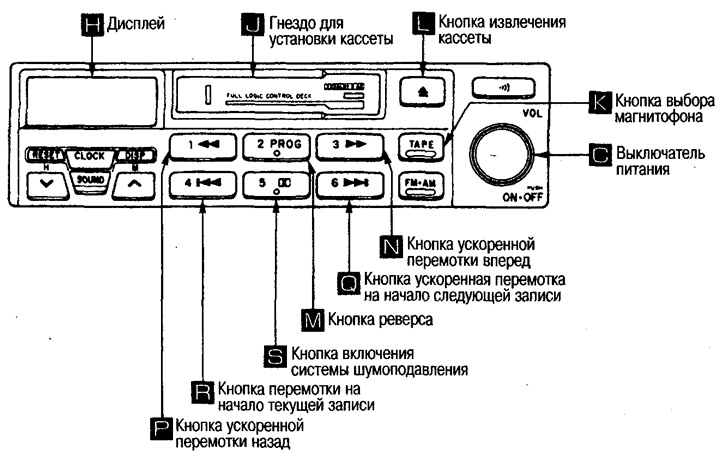
Playback is possible when the ignition key is in the Ace or ON position. Playback starts immediately after inserting a cassette into the J slot.
If the cassette is already installed, press the K button.
To stop playback, press the K button again.
Playback can also be stopped by pressing the C button. Pressing this button again will resume playback.
To eject the cassette, press the L button.
To change the direction of film movement, press the M button.
Fast forward and rewind
To fast forward, press the N button; to fast rewind, press the P button.
To stop, press the same button again or press the K button.
Listening with skipping recordings
To find the next entry, you need to fast forward to the beginning of the next entry. To do this, press the Q button.
To listen to the previous recording, press the R button.
To stop playback, press the K button.
Note: If the pause between recordings is less than 3 seconds or there is noise in the pauses, the system may not work correctly.
Listening to recordings with Dolby NR noise reduction system
Press the S button to turn on the noise reduction system (the display will show the sign
 )
)
To turn off the system, press the same button again.
Meaning of symbols on the display H
The display shows the current playback status.
- TARE: displayed during switching.
- FR is displayed during fast forward and flashes when searching for the next track.
- REW: Displayed during fast rewind and flashes when searching for the previous recording.
 : Displayed while the noise reduction system is operating.
 : The icon moves from left to right during playback and fast forward, and from right to left during rewind.