


Table of contents: General information and…↓ Anti-theft system ↓ Unlocking the audio system and…↓ Basic audio system control functions ↓ Radio ↓ Radio Data System (RDS) ↓ CD player ↓ Audio control buttons located on the…↓
General information and recommendations for using the audio system
The audio system operates when the key or ignition switch is set to the "Acc" or "ON" position. To improve the quality of radio reception, it is recommended to use an antenna. The antenna can be unscrewed from its socket located on the roof of the car.
In low temperatures or rainy weather, the compact disc (CD) player may not operate normally. In such cases, remove the disc and dry or ventilate the system. When driving on rough roads, CD playback may be interrupted. To ensure proper operation of the CD player, use clean, high-quality discs. The player may not play non-copyable discs (CCCD), recordable (CD-R) and rewritable (CD-RW) discs properly. To avoid malfunction, do not use discs with a diameter of 8 cm, non-round discs, or discs with paper labels.
Audio block
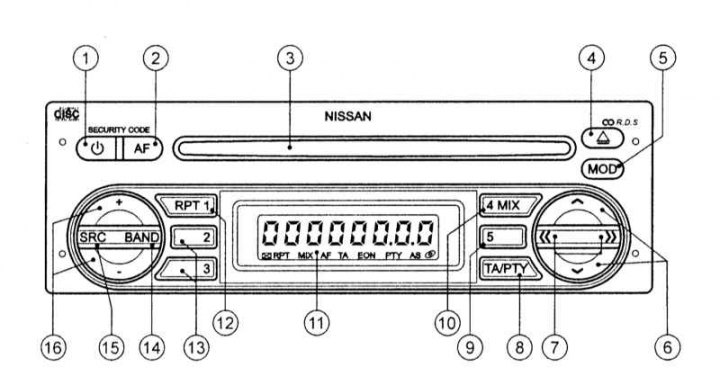
1 - Audio system power switch
2 — Switch for selecting the alternative frequencies (AF) of the radio signal
3 - CD loading slot
4 - CD eject button
5 — Audio system volume adjustment button
6 — Manual tuning of the radio receiver in the upper and lower ranges, buttons for selecting sound tuning modes
7 — Radio: automatic tuning in high and low ranges; cD player: sequential transition between records on a CD; buttons for setting adjustable sound parameters
8 — Traffic Information (TA)/Program Type (PTY) button
9,13 - Preset radio station selection buttons
10 — Radio: preset radio station selection button; cD player: switch for random playback of records
11 — Display
12 — Radio: preset radio station selection button; cD player: repeat playback mode switch
14 - Switch for radio bands LW, MW, FM
15 — Switch of type of work (SRC)
16 — Volume control
The audio unit includes a digital radio receiver operating in the long (LW), medium (MW) and ultra-short wave (FM) ranges, and a CD player. The audio unit is equipped with an anti-theft system and a traffic announcement function.
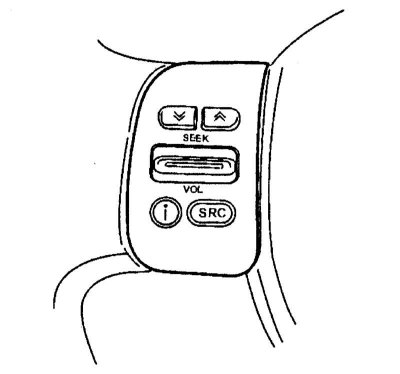
The main functions of the audio system can be controlled using the buttons located on the steering wheel. To do this, the key or ignition switch must be in the "Acc" or "ON" position, and the audio system must be turned on. A description of the operation of the buttons is given in a separate subsection.
When installing a CB radio, mobile phone or other electronic equipment on a vehicle, the following recommendations must be followed, otherwise the equipment being installed may adversely affect the operation of the fuel injection system or other electronic units of the vehicle. The antenna of the CB radio must be located as far as possible from the electronic control units of the vehicle systems (including the radio station). The antenna cable must be located no closer than 20 cm from the fuel injection system wiring. Do not lay the antenna cable near the vehicle's wiring harnesses. To eliminate standing radio waves, follow the recommendations of the manufacturer of the radio electronic equipment. Connect the body of the CB radio to the vehicle's "ground" with a wire.
Anti-theft system
Without knowing the individual code of the audio system, it will be impossible to turn it on after installation in another car, which significantly reduces the risk of its theft.
During normal operation, the audio system is unlocked and can be used in the usual way. When the audio system is disconnected from the on-board electrical network, the anti-theft protection system is activated, which blocks the subsequent activation of the audio system. To unlock it, you must enter an individual code. This code cannot be changed and is used only for a specific vehicle.
The unique audio system code is provided on the card supplied with the vehicle's operating documentation. Keep the code card in a safe place and never leave it in the vehicle. If you lose the audio system code card, contact an authorized Nissan dealer.
Unlocking the audio system and enabling service mode
If the audio system is locked, when you turn it on, the display shows the message "CODE" for two seconds, which then changes to the characters "0000".
For unlocking using the preset radio station selection buttons, enter your individual four-digit code. For example, to enter the code 5169, press first (1) the preset radio station selection button five times in a row, then the second, third and fourth buttons 1, 6 and 9 times respectively. Finally, confirm the code entry by pressing the ↑ button. If the correct code is entered, the audio system will turn on; otherwise, the display will not change and the audio system will not turn on.
When servicing your vehicle, you should remove security code audio systems, which will allow you to disconnect the battery (for example, for maintenance, etc.) without blocking the audio system. To do this, turn off the audio system and, while simultaneously holding down the 1st and 4th preset buttons, turn the audio system back on. Release the preset buttons.
Do not leave the vehicle unattended or park it in an unguarded area if the audio system code has been removed. Immediately after completing vehicle maintenance, activate the security code in the same way as when deactivating it. The anti-theft system is now active.
Basic audio system control functions
Power switch
Turn the key or ignition switch to the "Acc" or "ON" position, then press the audio system power switch for at least two seconds. The audio system will start operating in the same mode (radio or CD playback), which it was operating at immediately before switching off. The sound volume will be set to the level that was previously programmed to turn on the audio system (personalization modes). If there is no CD loaded, the message "NO DISC" will appear on the display. The audio system will turn on automatically if a CD is loaded, after which the disc will start playing.
To turn off the audio system, hold the power switch down for at least two seconds or turn off the ignition.
Adjusting the volume level and muting the sound
Press the " or "–" buttons on the control to set the desired volume level.
The sound is turned off by briefly pressing the CD audio system power switch. The message "MUTE" appears on the display. To turn the sound back on, briefly press the power switch again.
Switch Routine Control (SRC)
This switch allows you to choose between the radio or the CD player. Each time you press the switch, the active audio mode is shown on the display. If there is no CD loaded, the message "NO DISC" appears on the display.
Sound settings (MOD)
Press the "MOD" button and hold it in this position for at least two seconds to enter the sound settings menu. The "MENU ↑ ↓" indicator will light up on the display. Each time you press the ↑ or ↓ button, the sound settings modes are switched in a cyclic sequence: Bass (Low frequency level), Treble (HF level), Fader (Front/rear balance), Balance (Left/right balance), Loudness (Tone compensation), REG (Reception of local radio stations), Bass, etc. Set the desired sound parameters using the buttons in the selected mode << or >>.
Note: Bass and Treble levels are adjustable from -7 to 7, and balance values are adjustable from -9 (back/left) up to 9 (forward/right). Tone compensation is used to enhance the bass boost function. In REG mode, use the buttons << or >> you can turn this mode on or off.
After adjusting the sound, press the "MOD" button again to save the set adjustment levels in the audio system's memory.
When switching the type of audio system operation (radio or CD player) those sound settings are set (lF/HF levels and tone compensation), which have been previously set for the corresponding sound source. At the same time, the front/rear and left/right balance settings do not depend on the sound source.
Radio
Radio Band Switch (BAND)
At each short (less than two seconds) pressing the "BAND" button switches radio bands in a cyclic order: FM1, FM2, FMT, MW, LW, FM1, etc.
If you turn on the FM range and for a long time (at least two seconds) press the "BAND" button, the automatic programming function of the radio receiver's memory will be activated. The radio receiver will automatically find five FM stations with the strongest signal and enter their frequencies into the cells (from first to fifth) storage device (fMT range). During automatic programming of the radio memory, the message "T-STORE" and the symbol "AS" appear on the display and the sound is muted.
If the traffic announcement (TA) function is turned on, only those radio stations that broadcast traffic announcements are selected for storage.
Manual tuning of the radio receiver
Manual tuning of the radio receiver is performed using the buttons ↑ (increase in frequency) and ↓ (frequency reduction). The tuning frequency changes discretely, the step of changing the tuning frequency depends on the switched-on radio range and is 100 kHz in the FM ultra-short wave range, 9 kHz in the MW medium wave range and 3 kHz in the LW long wave range.
If you press the ↑ or ↓ button and hold it down for more than 0.5 s, the radio frequency will continuously increase or decrease until the button is released.
Automatic radio tuning
Automatic tuning can be performed at different sensitivity levels of the radio receiver. If the high sensitivity level "DX" is enabled, the receiver will tune to the nearest broadcasting radio station regardless of the received signal level. If the low sensitivity level "LO" is enabled, tuning will only occur on radio stations with a sufficiently strong signal, i.e. on local radio stations.
At one-time pressing the button >> or << the radio receiver starts searching for a working station in the upper or lower sub-range, respectively, relative to the current tuning frequency. The search stops as soon as the radio receiver tunes to the station closest in frequency. During the automatic tuning of the radio receiver, the sound is muted.
If the radio receiver, operating at a low sensitivity level "LO", was unable to tune in to any broadcasting station in the entire radio range, then the radio receiver will automatically switch to a high sensitivity level "DX". Then the radio receiver will continue to search for broadcasting radio stations in the same range. If the radio receiver still does not detect any broadcasting radio stations, then automatic tuning will stop.
If the traffic announcement (TA) or program type (PTY) function is switched on, the radio receiver is automatically tuned only to those radio stations that respectively broadcast a traffic announcement program or whose programs correspond to the pre-selected type.
Selecting pre-programmed radio stations
Tuning the radio to pre-programmed stations is done briefly (less than two seconds) by clicking on the corresponding buttons (from first to fifth). In case of prolonged (longer than two seconds) when you press a button, the corresponding memory cell of the radio receiver is reprogrammed, that is, the current tuning frequency of the radio receiver is entered into the memory cell whose number corresponds to the number of the pressed button.
Up to 15 FM radio stations can be programmed (5 in FM1, FM2 and FMT ranges). In the MW and LW ranges, you can also program 5 radio stations.
Radio station scanning mode
To turn on the scanning mode, press the SRC mode switch and hold it for at least two seconds. The radio receiver will begin to tune in all broadcasting radio stations one by one, starting with the current tuning frequency. During the search for radio stations, the "SCAN" indicator will light on the display. After tuning to the next radio station, reception continues for 10 seconds, and the display will show the name or broadcast frequency of this radio station. To turn off the scanning mode, press the SRC mode switch again.
If the traffic announcement (TA) or program type (PTY) function is switched on, the radio receiver is automatically tuned only to those radio stations that respectively broadcast a traffic announcement program or whose programs correspond to the pre-selected type.
Radio Data System (RDS)
The RDS system allows additional information to be transmitted simultaneously with the main FM radio signal in coded digital form. The RDS system supports many information service functions, such as: display of the radio station name on the display, reception of traffic reports and local news, automatic search for a radio station transmitting a program of a certain genre, etc.
Alternative Radio Frequencies (AF)
The Alternative Frequency (AF) function can be used with FM radio and CD playback.
The AF function is activated by a short press (up to two seconds) by pressing the "AF" button.
When the "AF" function is enabled, the following service functions are performed:
Function automatic radio retuning is that the radio receiver, by comparing the power of radio signals at all alternative frequencies (from the list of AF frequencies), automatically selects and tunes to the broadcast frequency that provides the best conditions for receiving the radio broadcast.
EON Extended Network Data Update. This function also works when the AF function is switched off. Reception of EON data allows the frequencies of preset stations to be automatically retuned to the same radio network. In addition, it becomes possible to use additional service functions provided by the network, such as receiving traffic announcements. When the radio is tuned to an RDS station that is part of the extended EON network, the "EON" indicator lights up on the display.
RDS functions
PS function (display the name of the radio station). Once the radio is tuned to an RDS radio station (manually or semi-automatically), the reception of RDS radio data begins and the name of the received station is immediately displayed on the display.
Function of interrupting the current mode with an alarm signal [ALARM INTERRUPTION – EBU (European Broadcasting Union) SPEC FOR INFO]. If the radio receives the alarm code "PTY 31", the current audio system operation mode is automatically interrupted and the message is broadcast. At the same time, the "ALARM" indicator lights up on the display. After the warning message ends, the audio system immediately returns to the original operation mode.
REG mode (reception of local radio stations). If you turn on the REG mode when the radio is operating in the FM range and is tuned to a local radio station broadcasting local programs, the radio setting will be saved and switching to other local radio stations will not occur.
TA function (reception of traffic messages). This function can be used when the FM band is on, as well as when playing CDs. The TA function is activated by a short (no longer than two seconds) by pressing the "TA" button. The TA function can be performed regardless of whether the AF function is on or off. When the TA function is on, the "TA" indicator lights up on the display. In short, (no longer than two seconds) press the "TA" button, the traffic announcement function will be turned off and the "TA" indicator will go out. If the "TA" function is turned on and the radio receiver operates in the medium MW or long LW wave range, then upon detecting a signal of a transmitted traffic announcement, the radio receiver will automatically switch from the MW or LW range to the FM range and tune in to the station transmitting the traffic announcement. If the "TA" function is turned off and the radio receiver is tuned to a station transmitting a traffic announcement program, the "T" indicator will light on the display. When you press the "TA" switch and turn on the traffic announcement function, the "TA" indicator will light on the display instead of the "T" indicator.
Function of interrupting the current mode with a traffic message. If the TA function is switched on, the radio, having detected a traffic announcement, tunes in to the station that is broadcasting the announcement and the volume is set to a preset level. After the traffic announcement has ended, the audio system returns to the operating mode it was in when the traffic announcement was interrupted. The volume is also set to the original level. Reception of a radio program of a station included in the extended EON network is automatically interrupted if a traffic announcement is also being broadcast by an EON radio station. After the traffic announcement has ended, the radio will return to the station that was previously tuned in. The TA function is switched off if one of the buttons is pressed during the traffic announcement "TA/PTY", "BAND" or "SRC".
Traffic news program search function. If the radio is unable to tune in a traffic information station over the entire range when the TA function is switched on, it reverts to the preset station. The message lights up on the audio system display for three seconds "NO TRAFFIC".
Set the volume level for traffic announcements. You can preset the volume level for traffic announcements using the personal settings menu.
Selecting a radio program type
The "PTY" function allows you to select a radio station broadcasting a program of a certain genre in the FM range (more than two seconds) when you press the "TA/PTY" button while the radio is in the FM range and the "PTY" function is off, the PTY type name of the radio program being received is displayed. When the PTY function is on, the "PTY" indicator lights up on the display.
PTY radio program type selection mode. The PTY type of radio program is selected using the ↑ and ↓ buttons of the manual receiver tuning, or using the buttons of the receiver tuning to pre-programmed radio stations. The names of the first five PTY types of radio programs are stored in the corresponding memory cells of the radio receiver. However, the memory cells can be reprogrammed. To do this, you should display the name of the desired PTY type of radio program on the display of the audio system and then long press (at least two seconds) press one of the five pre-programmed radio station selection buttons. The selected PTY radio program name will be entered into the corresponding memory cell of the radio receiver.
Radio program search function by specified PTY type is turned on by pressing one of the automatic radio tuning buttons (<< or >>). During this search, the display periodically shows the message "SEARCH" and the name of the specified PTY type of radio program. If the required radio program cannot be found, the message "NO PTY" lights up on the display for 2 seconds. The radio receiver will then continue to receive the program of the radio station to which it was previously tuned. If the radio receiver is tuned to a station that is broadcasting a program of the specified PTY type, the name of this radio station will appear on the display.
Personal settings menu
To enter this menu, press the power switch with the audio system turned off, having previously pressed and held the "MOD" switch in this position. If you press the ↑ or ↓ button, the following setup mode indicators will sequentially change on the display: PTY lang (pTY language: English, German or French), TA volume (volume level for traffic announcements), ON volume (initial volume level when turning on the audio system), HI CUT, PTY lang, etc. The parameters of the selected mode can be changed using the buttons << or >>. After setting the parameters to store them in the audio system's memory, press the power switch and turn off the audio system.
The "HI CUT" function improves the sound quality of the audio system when receiving radio broadcasts in the FM range. If there is interference, the high frequency level is automatically reduced. This also helps to reduce the level of interference. The "HI CUT" function is switched on and off by pressing the button << or >>. The "HI CUT 1" state corresponds to a reduction in the high frequency level, and the "HICUT 0" state corresponds to no sound correction.
CD player
Turn the key or ignition switch to the "Acc" or "ON" position and insert the CD into the loading window of the working (without inscriptions) side down. The disc will automatically load into the player and the first track will begin playing. If the CD is loaded while the radio is on, the radio will automatically stop and the disc will begin playing.
Warning! Do not press on the disc when loading it, this may cause the player to malfunction. To remove the disc from the player, press the disc eject button.
Sequential selection of recording start
Click on the button >> or <<, to go to the beginning of the next or current recording on the CD, respectively. The sound is turned off while searching for the beginning of the recording.
Fast playback of a recording
If you press the ↑ or ↓ button and hold it for more than two seconds, the recordings will be continuously fast-forwarded or reversed, respectively. During fast-forwarded playback, the sound is muted. Fast-forwarded CD playback continues until the button is released.
Record Repeat Playback (RPT) mode
To turn on repeat playback of the current recording, press the "RPT" button. The "RPT TRAK" indicator will appear on the display for two seconds, then be replaced by the "RPT" indicator. The repeat playback mode is turned off by pressing one of the buttons: "SRC" (the duration of pressing is not less than two seconds), "RPT" or "MIX".
Random sequence recording playback mode (MIX)
To turn on the mode of playing all records on the CD in random order, press the "MIX" button. The "MIX DISC" indicator will appear on the display for two seconds, which will then be replaced by the "MIX" indicator. This mode is turned off by pressing one of the buttons: "SRC" (the duration of pressing is not less than two seconds), "RPT" or "MIX".
Disc Browse Mode
If for a long time (at least two seconds) press the "SRC" button, and the audio system will begin to play the first 10-second fragments of each CD track in sequence. The disc review mode is turned off by pressing one of the buttons: "SRC" (the duration of pressing is not less than two seconds), "RPT" or "MIX".
Audio control buttons located on the steering wheel
Steering Ride Control (SRC)
Successive pressings of the "SRC" button result in cyclic switching of the audio system operating modes: MW, LW, FM1, FM2, FMT, CD, MW, etc. If a compact disc is not loaded, the message "NO DISC" appears on the display.
Note: Automatic radio tuning or CD sequential navigation buttons (↑ and ↓)
By pressing these buttons in radio mode, you can sequentially tune the radio receiver to pre-programmed radio stations.
If the "MIX" mode is off during CD playback, then with a short (no more than two seconds) pressing the ↑ or ↓ button will take you to the next or previous entry on the CD; otherwise (MIX mode is on) the tracks on the CD will be played in random order.
Volume control (VOL)
Set the desired sound volume by pressing the volume control button up (+) or down (–).