


Location of trip computer controls
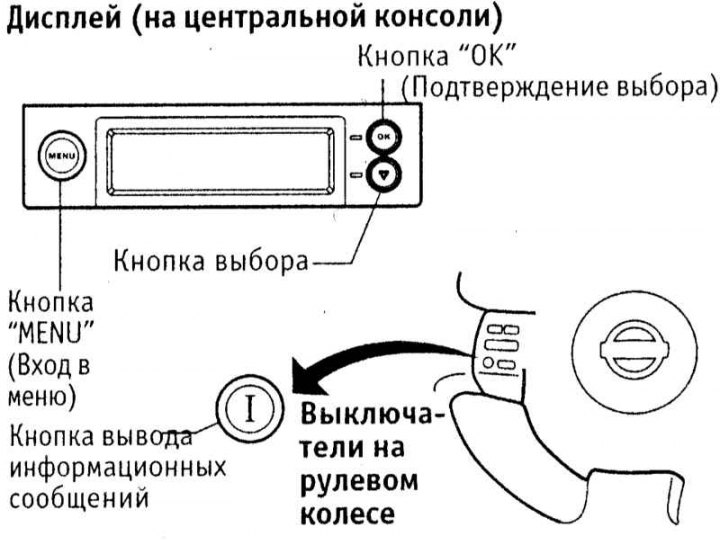
When the ignition is on, the trip computer data can be viewed sequentially on the multifunction display using the buttons on the display panel or the "I" button on the steering wheel.
Note: Display readings may be distorted at low temperatures and when exposed to strong magnetic fields.
Information messages
View trip computer data
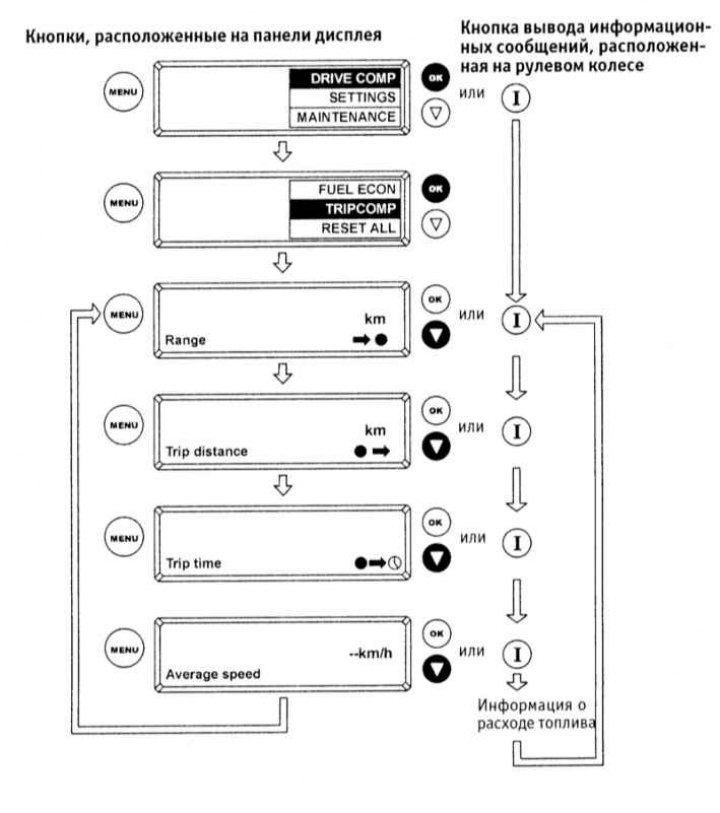
There are 4 types of information messages: fuel reserve mileage (Range), distance traveled (Trip distance), Trip time and average driving speed (Average speed). The sequence of actions required to access the designated trip computer data is shown in the illustration above. If there is little fuel left in the tank, the trip computer automatically displays the distance that can be traveled on the remaining fuel. The display flashes to attract the driver's attention. To return to the previous display mode, press the "MENU" or "I" button. If the fuel reserve continues to decrease, 4 lines are displayed instead of the mileage reserve figures. The distance traveled, travel time and average travel speed are calculated since the last reset. These readings can be reset either individually (to do this, press and hold the "OK" button for at least 1 second) or all at once. When resetting to zero, the average fuel consumption data is also reset. A general reset is only possible using the buttons on the display panel: in the main menu, select "DRIVE COMP", confirm your selection with the "OK" button, then select "RESET ALL" and "YES" in sequence.
To view fuel consumption data, select the "FUEL ECON" sub-item from the item "DRIVE COMP" in the main menu. Three types of fuel consumption messages can be displayed: average consumption (Average, updated approximately every 30 sec), instantaneous consumption (Inst, only available at speeds above 20 km/h) and accumulated data on average consumption (History). After the average fuel consumption value is reset, its current value is added to the accumulated data, which is presented on the display as a diagram. The triangle under the right column of the diagram marks the latest value of average fuel consumption.
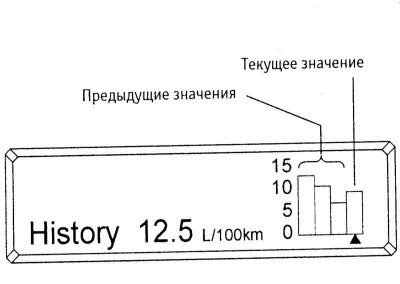
Display type when displaying accumulated data on average fuel consumption
Scheduled vehicle maintenance reminder
When the ignition is on, you can use the buttons on the display panel to program reminders about individual maintenance operations. When selling a car, an official Nissan dealer programs the trip computer for the mileage until the next scheduled maintenance (sub-item "SERVICE" in the menu "MAINTENANCE"). In order to program an additional reminder (sub-item "REMINDER" in the menu "MAINTENANCE") to replace any part of the car, perform the following operations.
- Use the select button to highlight a menu item "MAINTENANCE" and confirm your choice by clicking the "OK" button.
- Similarly, select the menu item "REMINDER 1".
- Enter the "SET NEXT" menu and set the mileage to the programmable reminder. Each time you press the selection button, the mileage to service increases by 500 km. Confirm your selection with the "OK" button.
- Press the "MENU" button to return the display to its original state. When the set mileage is reached, a reminder will appear on the display. The "ENABLE" and "DISABLE" menu items allow you to activate and deactivate the reminder. After setting a new mileage value, the reminder will disappear from the display.
Selecting the language of information messages
To change the language of messages, select "SETTINGS" in the main menu, then select "LANGUAGE" in the submenu that opens. A list of available languages will be displayed. Select the desired language and confirm your choice with the "OK" button.
Setting times and dates
Select the "SETTINGS" item in the main menu, then select the "TIME/DATE" item in the submenu that opens. Next, select the "CLOCK" item to set the time, and the "CALENDAR" item to set the date.
To set the current hour/minutes in the "CLOCK" menu, select the items accordingly "HOUR" / "MINUTE", then use the selection button to set the desired value. Item "12/24 HOUR" in the "CLOCK" menu is used to switch between time display formats. When displaying time in 12-hour format, the AM indicators are turned on (before noon) or PM (afternoon). To exit from the current setup screen to the main menu screen, press the "MENU" button.
To set the date/month/year in the "CALENDAR" menu, select the items accordingly "DAY" / "MONTH" / "YEAR". Set the desired value using the selection button. To exit the current setting screen to the main menu screen, press the "MENU" button.
(Original text on the website: «NISSANBOOK»)
To set the anniversaries of memorable events, select the "SETTINGS" item in the main menu, then select the item in the submenu that opens "ANNIVERSARY". Then select the event type: "WEDDING" (Wedding) "BIRTHDAY 1" (Birthday 1) or "BIRTHDAY 2" (Birthday 2). Then set the date and month of the event, following the same procedure as described for setting the current date. Using the item "ENABLE" / "DISABLE" you can turn the anniversary message on or off. To exit the current setup screen to the main menu screen, press the "MENU" button. When the set anniversaries occur, the display will show a message "Happy Anniversary" (Happy wedding anniversary!) or "Happy Birthday" (Happy birthday!).
Thermometer
On some models, the ambient temperature may be displayed on the information display (not in the salon). To do this, the ignition must be on. If the ambient temperature drops below 3 degrees, its indication will start to flash. After 20 seconds, the temperature value stops flashing, only its designation flashes. The low temperature warning remains active until it rises to 4 degrees.