


Setting the time
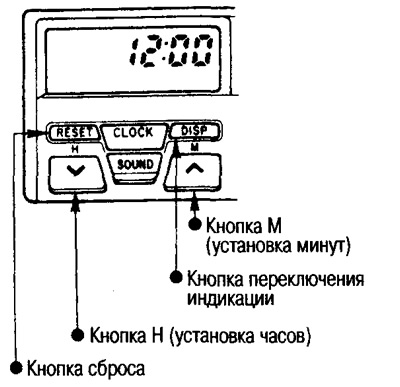
If you hold down the indication switching button (DISP) and press the H button, the hour display will change rapidly upwards; if you press the M button, the minute display will change rapidly. The switching will continue as long as you hold down the button.
Setting the exact time signal
When the clock is fast or slow within 5 minutes, you can set the clock readings using the exact time signal.
While the time signal is sounding, press the reset button.
Example:If the clock display is between 11:55 and 12:05, then after pressing the reset button the clock will display 12:00.
Switching indication
If you press the display switch button (DISP), the display will show the frequency of the received radio station for a few seconds and then switch to the time display.
Note: After removing the battery, the clock memory is erased. After installing the battery, set the time again.