


Table of contents: Driving a car with a manual…↓ Gear shifting ↓ Recommended maximum speed in each…↓ Driving a car with an automatic…↓ Driving a car with a continuously…↓ Forced downshifting when the…↓
Driving a car with a manual transmission
Moving the car from a standstill
1. Before starting off, fully depress the clutch pedal and move the lever to position 1 (First gear) or R (Reverse).
2. Gently press the accelerator pedal while releasing the clutch pedal and parking brake lever.
Gear shifting
- When changing gears, you need to fully depress the clutch pedal, shift to the desired gear and smoothly release the clutch pedal.
- Start off in 1st gear, then shift sequentially to 2nd, 3rd, 4th and 5th gear depending on your speed.
- If engaging first gear or reverse gear is difficult, move the lever to position N and release the clutch pedal. Wait a few seconds, then fully depress the clutch pedal again and try to engage the desired gear (R or 1).
- To engage reverse gear, stop the vehicle, move the gearshift lever to neutral position N, and then, by lifting the safety ring (1), move the lever to position R.
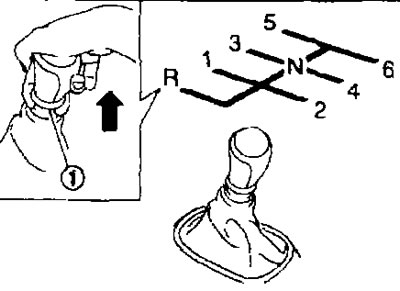
- The ring on the gear shift lever returns to its original position when the lever is moved to the N position.
Recommended maximum speed in each gear
Do not exceed the maximum recommended speed for each gear (see below). Follow the designated speed limits and choose the speed appropriate to the road conditions. Do not increase the engine's crankshaft speed when switching to a lower gear, as this may damage the engine or cause loss of control.
| For models with QR25DE engine | km/h |
| 1st gear | 44 |
| 2nd gear | 80 |
| 3rd gear | 118 |
| 4th gear | 156 |
| 5th and 6th gears |
| For models with MR20DE engine and 4WD drive | km/h |
| 1st gear | 41 |
| 2nd gear | 76 |
| 3rd gear | 111 |
| 4th gear | 147 |
| 5th and 6th gears | - |
| For models with MR20DE engine and 2WD drive | km/h |
| 1st gear | 44 |
| 2nd gear | 78 |
| 3rd gear | 108 |
| 4th gear | 140 |
| 5th and 6th gears |
Driving a car with an automatic transmission
To ensure high dynamic performance and smooth operation, your vehicle's automatic transmission is equipped with an electronic control system.
Moving the car from a standstill
1. After starting the engine, you must fully depress the brake pedal before moving the gear selector lever from position P.
2. While holding down the service brake pedal, move the selector lever to the desired range of movement.
3. Release the parking brake and service brake pedal and, while smoothly pressing the accelerator pedal, begin moving.
The gearbox is designed in such a way that to move the selector lever from position P to any other position, the brake pedal must be depressed and the ignition key must be in the ON position.
The selector lever cannot be moved from position P to any other position if the key in the ignition switch is in the LOCK OFF or Acc position or if there is no key in the ignition switch.
Gear shifting
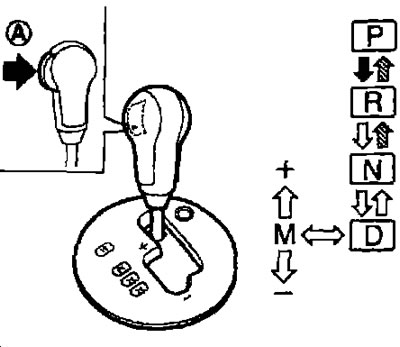
 Press button (A) while pressing the brake pedal.
 Press button (A).
 Move the automatic transmission selector lever.
- After starting the engine, you need to fully depress the brake pedal and move the selector lever from position P.
- If the ignition key is in the OFF or ACC position and the selector lever is in any position except the P position, the ignition key cannot be turned to the LOCK position. In this case, proceed as follows:
1. Apply the parking brake.
2. Turn the ignition key to the ON position with the brake pedal depressed.
3. Set the selector lever to position P.
4. Turn the ignition key to the LOCK position.
R (parking).
The automatic transmission selector lever should be in this position when the car is parked and when the engine is started. Before moving the lever to position P, make sure that the car is completely stopped. Apply the parking brake. When stopping on a slope, first press the brake pedal, then apply the parking brake and only then move the selector lever to position P.
R (reverse).
- Move the selector lever to position R only after the vehicle has come to a complete stop.
- Use this position for reversing.
N (neutral gear).
In this position, the forward and reverse gears are not engaged. This position of the selector lever can be used to start the engine. You can select the N position and start a stalled engine of a moving vehicle.
D (moving forward).
This position is intended for forward movement of the vehicle under normal conditions.
Manual gear shift mode
- When the automatic transmission selector lever is moved from position D to the manual gear shift sector (on a stationary vehicle or while moving) The automatic transmission switches to manual gear shifting mode. You can select gears manually.
- In manual gear shift mode, the gear range is displayed in the selector lever position indicator window on the instrument panel.
- Shift gears up and down in sequence: M1→M2→M3→M4→M5→M6.
- To shift into a higher gear, tilt the selector lever towards the "+" symbol (up).
- To shift to a lower gear, tilt the selector lever towards the "-" symbol (down).
- Moving the selector lever again to one side will cause the gears to change sequentially. However, if this movement is done too quickly, the second shift may not be performed properly.
M6 (6th gear).
This gear is designed to move the vehicle forward under normal conditions. Shift to a lower gear when accelerating or passing another vehicle.
M5 (5th gear).
Engage this gear on long uphill or downhill gradients and to provide engine braking.
M4 (4th gear), M3 (3rd gear) and M2 (2nd gear):
Use these gears when driving uphill and for effective engine braking on M1 descents (1st gear)*.
Use this gear for climbing steep grades at low speeds and when driving slowly in deep snow, sand or muddy conditions. This gear provides maximum engine braking on steep descents.
- To cancel manual shift mode, return the selector lever to position D. The transmission will return to normal automatic shift mode.
Forced downshifting of the gearbox when the accelerator pedal is pressed sharply in position D
To quickly overtake or climb a significant hill, press the accelerator pedal all the way down. The gearbox will automatically downshift depending on the current speed of the car.
Removal the selector lever lock
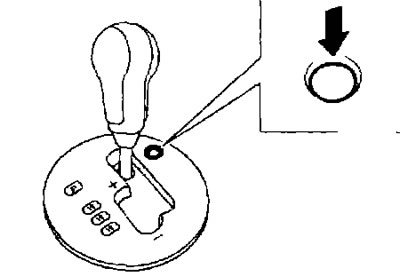
If the battery is discharged, the selector lever cannot be moved from position P even if the brake pedal is depressed.
To move the selector lever, press the lock release button. The selector lever can now be moved to the N position, but the steering wheel will remain locked until the ignition key is turned to the ON position.
To remove the block, you need to do the following:
1. Turn the ignition key to the LOCK position and remove the key.
2. Apply the parking brake.
3. Press the unlock button.
4. Press and hold the button on the selector lever, move it to position N, while simultaneously holding down the lock release button.
- Turn the ignition key to the ON position to release the steering lock.
- If the selector lever cannot be moved from position P, you should contact a service station as soon as possible to have the automatic transmission checked.
Automatic transmission emergency mode
- After activating the automatic transmission emergency mode, engaging the selected gear will become impossible.
- If the vehicle is driven under very severe conditions, such as alternating intense wheel spin with emergency braking, the automatic transmission may switch to emergency mode. This happens even if the electrical system is fully functional. In this case, turn the ignition key to the OFF position and wait 3 seconds. Then turn the ignition key back to the ON position. The vehicle should return to normal operation. If this does not happen, you should contact a service station to check and repair the automatic transmission.
Driving a car with a continuously variable transmission (CVT)
To ensure high dynamic performance and smooth operation, your vehicle's continuously variable transmission is equipped with an electronic control system.
Moving the car from a standstill
1. After starting the engine, you need to fully depress the brake pedal until the gear selector lever is moved from position P.
2. While holding down the service brake pedal, move the selector lever to the desired range of movement.
3. Release the parking brake and service brake pedal and, smoothly pressing the accelerator pedal, start moving.
The variator is designed in such a way that to move the selector lever from position P to any other position, the brake pedal must be depressed and the ignition key must be in the ON position.
The selector lever cannot be moved from position P to any other position if the key in the ignition switch is in the LOCK OFF or ACC position or if there is no key in the ignition switch.
Switching modes
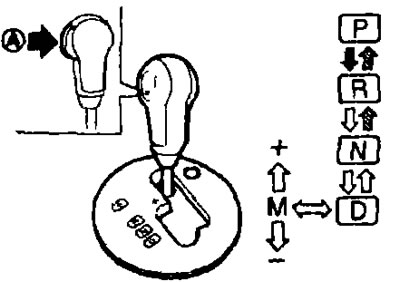
With the ability to enable manual control mode.
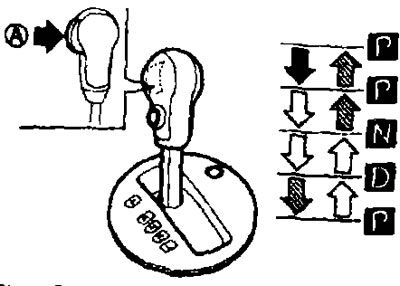
Without the ability to enable manual control mode.
 Press button (A) while pressing the brake pedal.
 Press button (A).
 Move the CVT selector lever.
- After starting the engine, you need to fully depress the brake pedal and move the selector lever from position P.
- If the ignition key is in the OFF or ACC position and the selector lever is in any position except the R position, the ignition key cannot be turned to the LOCK position. In this case, proceed as follows:
1. Apply the parking brake.
2. Turn the ignition key to the ON position with the brake pedal depressed.
3. Set the selector lever to position P.
4. Turn the ignition key to the LOCK position.
R (parking).
The CVT selector lever should be in this position when the car is parked and when the engine is started. Before moving the lever to the P position, make sure that the car is completely stopped. Apply the parking brake. When stopping on a slope, first press the brake pedal, then apply the parking brake and only then move the selector lever to the P position.
R (reverse).
- Move the selector lever to position R only after the vehicle has come to a complete stop.
- Use this position for reversing.
N (neutral gear).
In this position, the forward and reverse gears are not engaged. This position of the selector lever can be used to start the engine. You can select the N position and start a stalled engine of a moving vehicle.
D (moving forward).
This position is intended for forward movement of the vehicle under normal conditions.
L (Low gear) (if any)*.
Use this position for climbing steep hills at low speeds, or when driving slowly through deep snow, sand or muddy ground. This mode provides maximum engine braking on steep descents.
Manual variator control
- When the selector lever is moved from position D to the manual gear shift sector (on a stationary vehicle or while moving). CVT switches to manual gear shifting mode You can select gears manually.
- In manual control mode, the selected gear number is displayed in a window on the instrument panel.
- Shift gears up and down in sequence: M1→M2→M3→M4→M5→M6.
- To shift into a higher gear, tilt the selector lever towards the "+" symbol (up).
- To shift to a lower gear, tilt the selector lever towards the "-" symbol (down).
- Moving the selector lever again to one side will cause the gears to change sequentially. However, if this movement is done too quickly, the second shift may not be performed properly.
M6 (6th gear).
This gear is designed to move the vehicle forward under normal conditions. Shift to a lower gear when accelerating or passing another vehicle.
M5 (5th gear)*.
Engage this gear on long uphill or downhill gradients and to provide engine braking.
M4 (4th gear), M3 (3rd gear) and M2 (2nd gear):
Use these gears when driving uphill and for effective engine braking on descents.
M1 (1st gear)
Use this gear for climbing steep grades at low speeds and when driving slowly in deep snow, sand or muddy conditions. This gear provides maximum engine braking on steep descents.
To cancel manual gear shifting mode, return the selector lever to position D. The CVT will return to normal automatic operation.
If the CVT fluid temperature is low, the manual control mode may not engage and the CVT will return to automatic operation. This is not a sign of a malfunction. Return the selector lever to position D, and after a while, try again to switch to manual control.
If the CVT fluid temperature is high, upshifting may occur at a lower engine speed than normal, but this is not a sign of a malfunction.
SPORT mode switch (if any)
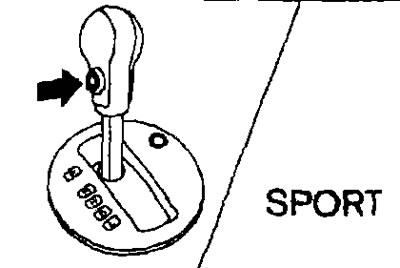
To turn on the SPORT mode, press the switch indicated when the selector lever is in the D position, the SPORT mode indicator on the instrument panel will light up. Press the switch again to turn off the SPORT mode. The SPORT indicator will turn off. When the selector lever is moved to any position other than D, the SPORT mode will be automatically turned off.
OFF position.
Use this position for normal driving conditions and to save fuel.
ON position:
- Use the ON position when driving on long downhill or uphill gradients, when engine braking is required, or for hard acceleration. The transmission will automatically set the optimum gear ratio for the most efficient use of engine power.
- Once driving conditions change, press the switch to turn off SPORT mode.
- It is not recommended to drive at high speed for a long time with the SPORT mode on. Remember that this increases fuel consumption
Forced downshifting when the accelerator pedal is pressed sharply to position D
To quickly overtake or climb a steep hill, press the accelerator pedal all the way down. The transmission will automatically set a higher gear ratio depending on the current speed of the car.
Removal the selector lever lock
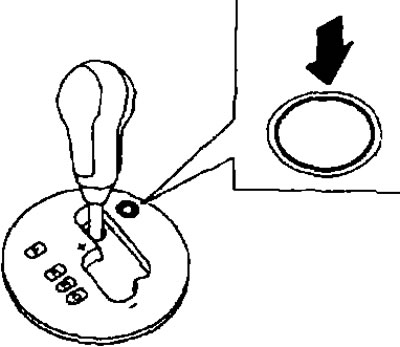
With the ability to enable manual control mode.
- If the battery is discharged, the selector lever cannot be moved from position P even if the brake pedal is pressed.
- To move the selector lever, press the lock release button. The selector lever can now be moved to the N position, but the steering wheel will remain locked until the ignition key is turned to the ON position.
- To remove the block, you need to do the following:
1. Turn the ignition key to the LOCK position and remove the key.
2. Apply the parking brake.
3. Press the unlock button.
4. Press and hold the button on the selector lever, move it to position N, while simultaneously holding down the lock release button.
5. Turn the ignition key to the ON position to release the steering lock.
- If the selector lever cannot be moved from the R position, contact a service station to have the CVT checked.
CVT overheating protection
If the fluid temperature gets too high, engine power and in some cases vehicle speed will be limited to prevent transmission damage. This can happen when driving up steep hills in hot weather with a heavy load or when towing a trailer, you can control the vehicle speed with the accelerator pedal, but engine speed and vehicle speed will be limited.
Emergency operation mode
- Once the CVT emergency mode is activated, engaging the selected gear will become impossible.
- If the vehicle is driven under severe conditions, such as alternating intense wheel spin with emergency braking, the CVT may switch to emergency mode. This happens even if the electrical system is fully functional. In this case, turn off the ignition and wait 10 seconds. Then turn the ignition key to the ON position. The vehicle should return to normal operation. If this does not happen, contact a service station to check and repair the CVT.