


Table of contents: System "Intelligent Key" (if any) ↓ Manual transmission (MKL) ↓ Automatic transmission (AT) or…↓ Steering shaft lock ↓ Ignition switch positions ↓
System "Intelligent Key" (if any)
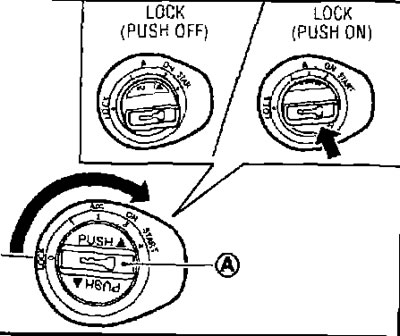
Remove the plug (A) before inserting the mechanical part of the key into the ignition switch.
Range
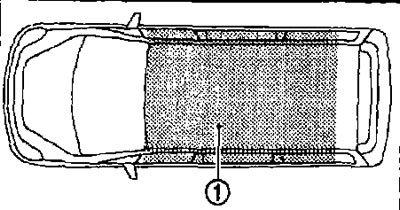
- System "Intelligent Key" can be used to start the engine only if the key "Intelligent Key" is within its range (1).
- If the key's power supply "Intelligent Key" the system's range is low or there is a strong source of radio waves in the area "intelligent Key" decreases and it may not function properly.
- When the key "Intelligent Key" is within range, then any person, even if he does not have the key with him "Intelligent Key", can press the start button in the ignition switch and start the engine.
- The luggage compartment is not within the system's coverage area, but a key located there may still work.
- When the key "Intelligent Key" located on the control panel in the glove compartment or door pocket system "Intelligent Key" may not function.
- The system works when the key "Intelligent Key" located near a door or window on the outside of the vehicle.
Manual transmission (MKL)
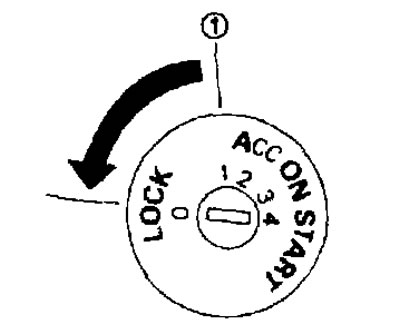
Without a system "Intelligent Key".
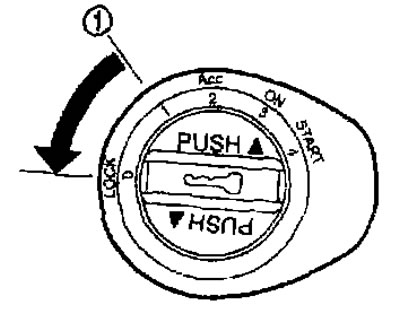
With the system "Intelligent Key".
- The ignition switch contains a device that prevents accidental removal of the key while the engine is running.
- The key can only be removed from the ignition switch when in the LOCK position.
- The OFF position (1) is located between the LOCK and Acc positions, although there is no such mark on the ignition switch housing.
(The original is available on the web page: NISSANBOOK.RU)
Models with system "Intelligent Key"
- It is possible to turn the ignition key to the LOCK position only after pressing the PUSH button (2).
- If the PUSH button has not been pressed and the ignition key has not been fully turned to the LOCK position, the lock indicator lamp will start flashing "Intelligent Key" and a beep will sound.
- When using the mechanical part of the key, it is also necessary to press the PUSH button in order to turn the ignition key to the LOCK position, although in this case the indicator lamp does not flash and the sound signal does not turn on.
Automatic transmission (AT) or continuously variable transmission (CVT)
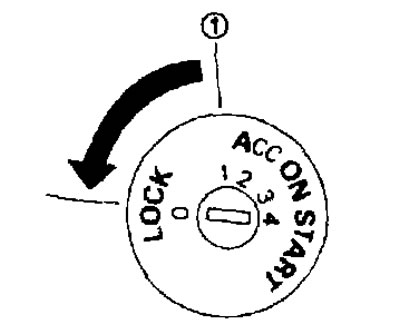
Without a system "Intelligent Key".
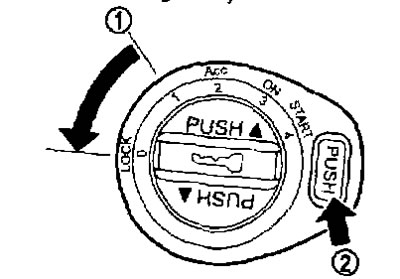
With the system "intelligent Key".
- The design of the ignition switch on cars with automatic transmission is such that the key in the ignition switch cannot be turned to the LOCK position unless the selector lever is first set to the P position. After turning the ignition key to the LOCK position, in order to remove the key, make sure that the selector lever is set to the P position.
- If the key does not turn to the LOCK position, then to remove it from the ignition switch, do the following:
1. Set the selector lever to position P.
2. Turn the key slightly in the ON direction.
3. Turn the key towards LOCK.
4. Remove the key.
- If the ignition key is in the LOCK position, the selector lever cannot be moved out of position P. It can be moved if the ignition key is in the ON position and the brake pedal is pressed.
- The OFF position (1) is located between the LOCK and Ace positions, although there is no such mark on the ignition switch housing.
Steering shaft lock
Steering shaft lock
1. Turn the ignition key to the LOCK position.
2. Remove the key from the ignition switch.
3. Turn the steering wheel 1/6 turn to the right from the center position.
Removal the steering shaft lock
1. Insert the key into the ignition switch.
2. Turn the key slightly in the ignition switch while rocking the steering wheel in both directions.
Ignition switch positions
LOCK (0)
- The key can only be removed from the ignition switch in this position.
- The steering shaft can only be locked in this position.
System "Intelligent Key":
PUSH OFF - The steering shaft can only be locked in this position.
PUSH ON - The ignition switch will be unlocked provided that the key "Intelligent Key" is with you.
OFF (1)
The engine is turned off, the steering shaft is not locked.
Ace (2)
This position provides power to auxiliary electrical equipment, such as a radio, when the engine is not running.
ON (3)
In this position, the ignition is turned on and power is supplied to all energy consumers.
START (4) (starter)
The starter is engaged to start the engine. Once the engine starts, release the key immediately. It will automatically return to the ON position.