


Table of contents: Replacing the front handbrake cable ↓ Replacing the rear handbrake cables ↓
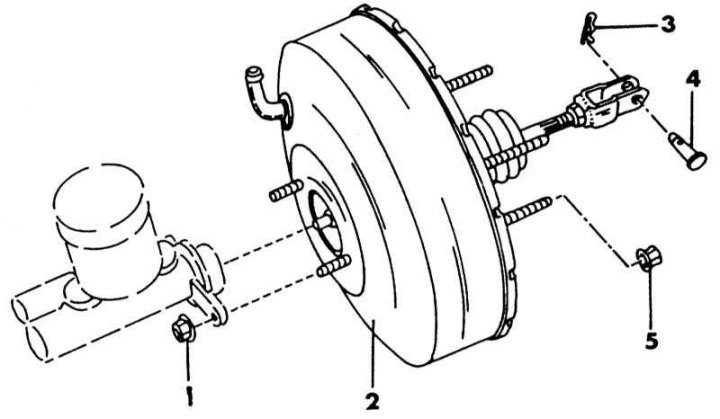
Brake booster in case of installed ABS system
1 - nut, 8-11 Nm; 2 - brake booster; 3 - cotter pin; 4 - cotter pin; 5 - nut, 13-16 Nm
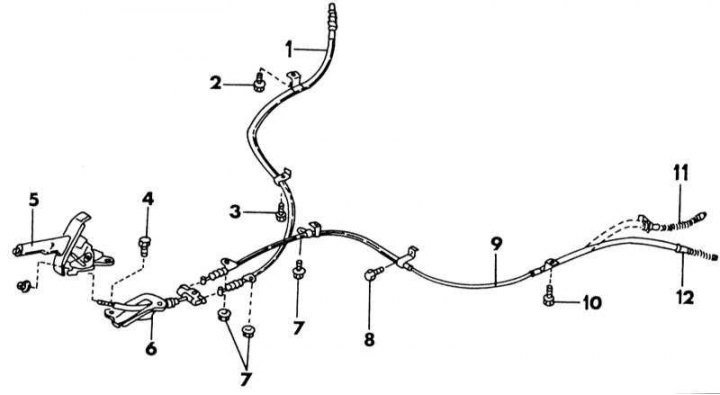
Location of handbrake cables
1 - rear cable; 2 - bolt, 3.5-4.5 Nm; 3 - bolt, 3.5-4.5 Nm; 4 - bolt, 8-11 Nm; 5 - handbrake lever; 6 - front cable; 7 - bolt, 3.5-4.5 Nm; 8 - bolt, 3.5-4.5 Nm; 9 - rear cable; 10 - bolt, 8-11 Nm; 11 - end of cable, drum brakes; 12 - end of cable, disc brakes
Replacing the front handbrake cable
On illustrations the location of both handbrake cables is shown, as well as the fastening of the front cable to the handbrake lever. When replacing the cable, refer to this illustration.
1. Raise the vehicle and support it on supports.
2. From the bottom, remove the two nuts of both cables and unhook both cable ends from the equalizer arm.
3. Remove the shift console.
4. Disconnect the handbrake indicator light cable plug.
5. Loosen the handbrake lever mounting bolts and unscrew the front cable holder.
6. Remove the cable.
7. Installation is carried out in the reverse order of removal. Tighten the handbrake lever and the cable bolts on the bottom with the specified torques.
8. Fasten the cables according to illustrations. Lubricate all sliding elements of the handbrake cable well.
Replacing the rear handbrake cables
1. With the drum brakes installed, disconnect the handbrake cables from the brake shoes as described when removing and installing the shoes in Section Rear brakes. Then make the removal according to illustrations.
2. With disc brakes installed, remove the mount and retainer plate on the rear caliper (see illustration) and then remove the cables in accordance with illustration.
3. Installation is carried out in the reverse order. All tightening torques shown in the illustration must be maintained. Not all bolts have the same tightening torque.