


Attention.
- Do not touch the contact surfaces of the battery and remote control with your fingers.
- Incorrect disposal of used batteries may pose a danger to the environment. Please comply with local regulations when disposing of old batteries.
- The remote control and Intelligent Key are waterproof, but if they come into contact with water, you should immediately wipe the remote control dry. To replace the remote control/Intelligent Key power element, carefully open it as shown in the figure.
- When replacing the paging element, protect the remote control/Intelligent Key from dust and oil.
- The battery should be held only by the edges as shown in the picture. If you touch the contact surfaces with your hands, the battery capacity will be significantly reduced.

1. Open the case.
Remote control: Loosen the cover mounting screw with a Phillips screwdriver.
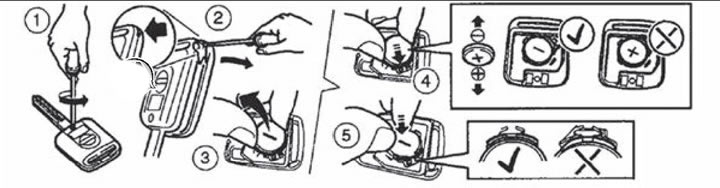
Remote control for door locks
Intelligent Key: Insert the tip of a flat-head screwdriver or other suitable tool into the slot on the end of the remote control and turn the screwdriver to open the cover.
The original is posted on the portal [nissanbook.ru]
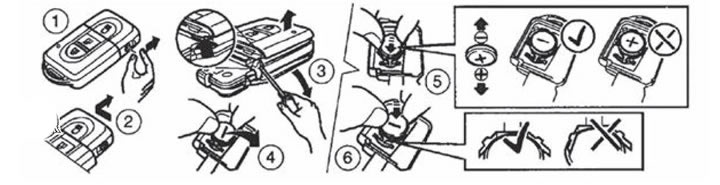
Intelligent Key System Key
2. Replace the discharged battery with a new one.
Note.
- The battery used in the remote control is CR2016.
- The battery used in the Intelligent Key system key is CR2032.
Attention.
- Do not touch the printed circuit board or electrical contacts as this may cause the remote control to malfunction.
- The battery must be inserted in the correct direction so that the positive pole ("+") faces the bottom of the case, as shown in the figure.
3. Replace the cover in reverse order.
4. Press the buttons on the remote control to check its functionality.
Note: If you have difficulty replacing the battery, please contact your authorized Nissan dealer.