


Table of contents: Remote control, replacing its battery ↓ Replacing the battery ↓ System "Intelligent Key" ↓
Warning! Children should not be left unattended in a vehicle with keys in it, especially if the key is inserted into the ignition. Children have a habit of imitating adults and may insert the key into the ignition and turn on the ignition or start the engine. This may result in injury to children when using, for example, electric windows or an accident if the vehicle starts moving.
The car comes with a main and a spare key, each of which fits the ignition switch and the driver's door lock, although the key bit does not fit into the door lock cylinder to its full length. Only keys designed for the Nissan Immobilizer (NATS) can be used on the Nissan Micra.
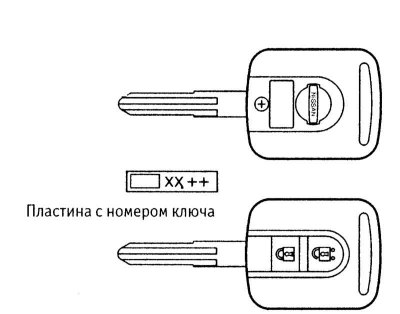
Main key with built-in remote control
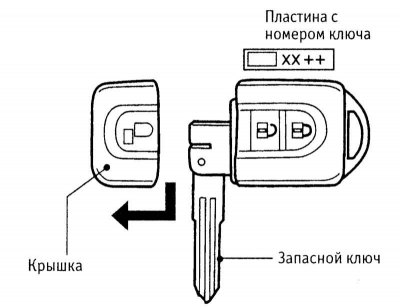
Keychain with remote control and spare key and systems "Intelligent Key"
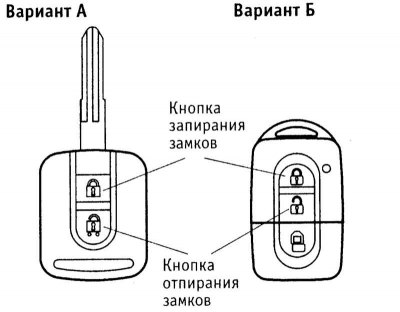
Single lock control buttons on the remote control
The key number, stamped on a special plate, should be written down on paper and kept in a safe and secure place (not in the car!). The number must be provided to order duplicate keys (contact your Nissan representative). No more than four keys can be used on one vehicle at the same time.
Remote control, replacing its battery
Note: To avoid damage to the electronic components located in the remote control, do not subject it to strong mechanical stress (deformations, impacts), high temperatures and humidity.
The remote control is designed to lock and unlock all car locks from outside. The remote control works at a distance of about 5 meters from the car. If the operating distance of the remote control decreases under the same conditions, replace the battery of the remote control.
Before locking your vehicle using the remote control, remove the key from the ignition or take the key fob with you, and close all windows and the sunroof. Make sure all doors are securely closed.
On vehicles with additional locking, do not lock them with the remote control if there are people inside the vehicle. The additional lock will not allow them to unlock the doors from the inside.
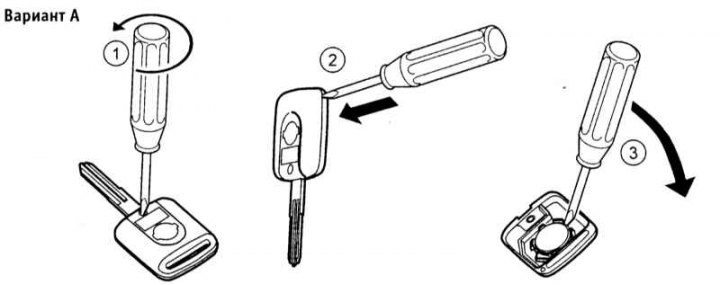
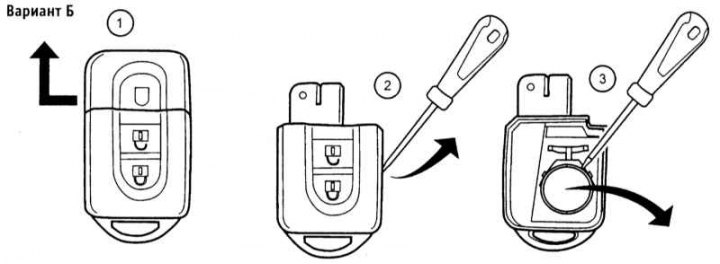
To replace the remote control battery, carefully open it following the instructions in the illustrations below. Remove the old battery and install the new one, observing the polarity. Carefully close the remote control case. The battery type is indicated in Specifications.
Replacing the battery
System "Intelligent Key"
This system allows you to unlock and lock the doors, as well as start and stop the engine without using a traditional key or remote control. When approaching the car at a distance of 0.8÷1.5 m, the key fob "Intelligent Key" (See illustration Keychain with remote control and spare key and systems "Intelligent Key") sends an individual code signal, which allows the owner to manually lock or unlock any door by pressing the switch in its handle.
Note: To avoid disruption of the system operation algorithm "Intelligent Key" do not leave a duplicate key fob in the car. A buzzer that sounds when you press the lock button in the door handle will remind you of a key fob left in the car.