


Table of contents: Locking and unlocking doors using…↓ Locking and unlocking door locks…↓ Locking and unlocking doors with a…↓ Locking doors with a single lock…↓ Emergencies in vehicles with…↓ Additional rear door lock lock ↓ Tailgate lock ↓
Locking and unlocking doors using the remote control
For locking locks, remove the key from the ignition, close all doors and press the lock button on the remote control (see illustration Single lock control buttons on the remote control). The direction indicators will flash once, confirming that the locks are working properly. If you press the button again, the direction indicators will flash once again, reminding you that the locks are already locked.
For unlocking locks, press the corresponding button on the remote control unit - the driver's door lock will unlock and the turn signals will flash twice. If you press the unlock button again within 5 seconds after unlocking the driver's door, all the doors will unlock. The turn signals will flash 2 or 3 times (respectively when using remote control type A or B).
If, within approximately 2 minutes after the locks have been fully or partially unlocked, any door is not opened or the key is not inserted into the ignition switch, the locks are automatically locked.
Locking and unlocking door locks with the system "Intelligent Key"
Note: Normal system operation "Intelligent Key" may be disrupted due to external factors. In such cases, use the spare key located inside the key fob.
Before locking doors, make sure that the system key fob "Intelligent Key" is not left in the car and press all doors. Press the locking switch in the handle of one of the doors. All doors will lock and the turn signals will flash once.
For unlocking locks, press the corresponding button in the handle of one of the doors - only this door will unlock and the direction indicators will flash twice. If you press the unlock button again within 5 seconds after unlocking one door, all the doors will unlock. The direction indicators will flash 3 times (first once, then briefly twice).
Locking and unlocking doors with a discharged battery
In this situation, the driver's door can be unlocked and locked using the main or spare key.
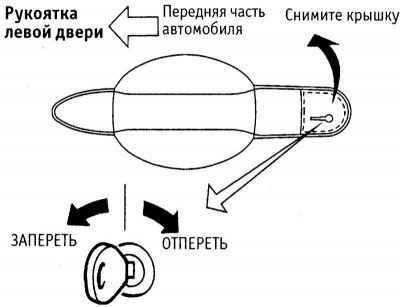
Unlocking and locking the door lock with a key
For locking/unlocking carefully remove the cover from the driver's door handle, insert the key into the slot in the lock cylinder and turn the key in the desired direction.
Note: The lock will only unlock and lock in this manner when the door is closed.
If the vehicle is equipped with an additional locking system, the additional locking must be removed after charging or replacing the battery. To do this, insert the key into the ignition switch or switch and turn it to the "ON" position. You can also unlock the front passenger door with the key or remote control for this purpose.
Locking doors with a single lock switch
Warning: When locking the doors using the key switch, do not leave the keys in the vehicle.
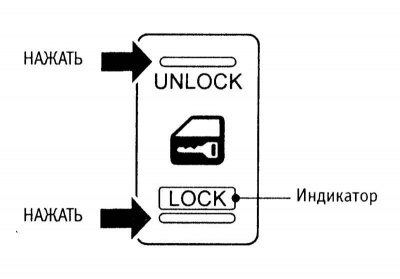
Single lock switch on the center console
The single lock switch, located on the center console, allows you to lock and unlock all doors of the car when the driver's door is closed. However, if the additional locking system is active, this switch does not allow you to unlock the doors.
To lock all doors, turn the master lock switch to the "LOCK" position with the driver's door open, then close it. The key should not be in the ignition switch and the key fob should not be in the ignition switch "Intelligent Key" must be outside the vehicle. On models with an additional locking system, the additional locking is not activated with the specified locking method.
If you are in the car and press the lock button on the key fob "Intelligent Key", all door locks will be locked and the indicator of the single lock switch will light up. However, it will not be possible to unlock the door locks using the single lock switch. To unlock the locks, press the corresponding button on the remote control.
If, with the driver's door open, you lock the doors using the single lock switch and the remote control "Intelligent Key" is in the car, then when the driver's door is closed, all the doors will unlock and the buzzer will sound. This precaution is provided to prevent the door locks from locking when the key fob is left in the car "Intelligent Key".
Emergencies in vehicles with additional locking system
If the additional locking system is activated during an accident or for another unexpected reason while the driver is inside the vehicle, follow these steps.
Insert the key into the ignition and turn it to the "ON" position. This will remove the additional lock. After unlocking the locks, you can open the doors from inside the car.
Open the window or break the glass of the front passenger door. Remove the protective cover from the outside handle of the passenger door, insert the key into the slot of the lock, unlock it by turning the key. After that, you can open the door and get out of the car.
Remove the key from the ignition and unlock the doors using the remote control.
Additional rear door lock lock
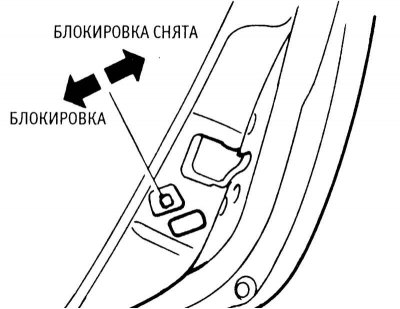
Rear door additional lock switch
IN rear doors provided additional locking of locks, designed to prevent children from opening them in the rear seat. To prevent the rear door from being opened from the inside, move the lever in the lock (at the end of the door) to the "Lock" position and close the door. Now it can only be opened from the outside. To open the door again from the inside, open it from the outside and return the lever to its original position.
Tailgate lock
A single lock provides locking and unlocking of all doors, including the tailgate.
If the car is not locked, the rear door lock can be unlocked manually from outside the car using the microswitch located at the bottom of the rear door.
The tailgate cannot be unlocked from the outside if the vehicle is locked with a single lock. In this case, pressing the microswitch located on the tailgate will cause a warning sound to sound (models with type A remote control – see illustration Single lock control buttons on the remote control).