


Table of contents: Locking door locks ↓ Unlocking door locks in normal mode ↓ Unlocking door locks in attack…↓ Switching from normal mode to attack…↓ Remote control malfunctions ↓
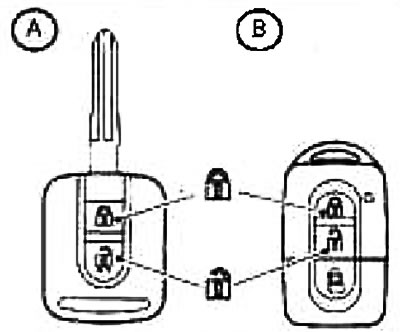
You can lock and unlock all doors from outside the car using the remote control built into the key handle by pressing the lock button
 or on the lock release button
For safety reasons, it is possible to remotely unlock only one driver's door, independently of the other doors. This measure helps prevent unauthorized persons from entering the vehicle through the passenger doors after they have been unlocked.
The built-in remote control for the central lock can be operated from a distance of approximately 5 meters from the car. The actual range of the remote control depends on the conditions immediately around the car and the state of the battery in the remote control.
Locking door locks
- 1. Remove the key or remote control from the ignition switch "Intelligent Key"
- 2. Close all doors.
- 3. Click on the button locking system located on the remote control
- All doors will be locked.
- The hazard warning light will flash once
If you press the lock button on the remote control when the doors are already locked, the hazard warning lights will flash once to remind you that you have already locked the vehicle doors.
Note:
- The automatic re-locking function is activated after the vehicle is fully or partially unlocked if the owner does not take any further action.
- Automatic re-locking of the locks occurs approximately two minutes after the car locks are fully or partially unlocked. This locking function is disabled when any door of the car is opened or if the key is inserted into the ignition switch (option (A))
Unlocking door locks in normal mode
Press the unlock button located on the remote control.
- All doors are unlocked
- The hazard warning light will flash twice
Unlocking door locks in attack protection mode (antihijack)
- 1 Press the button once unlocking the locks, located on the remote control.
- Only the driver's door lock will be unlocked.
- The hazard warning indicator will flash twice at short intervals.
- 2 Press the button again unlocking the locks, located on the remote control.
- All doors are unlocked
- The hazard warning light will flash twice.
Switching from normal mode to attack defense mode
Version Ⓐ - key with remote control
In the normal operation mode of the remote control, exit the car and lock the doors using the remote control. Then press the buttons simultaneously
and within 5 seconds. The attack protection mode will be set. This procedure must be performed with the ignition switch in the OFF position.
The hazard warning lights will flash once to confirm successful entry into the attack defense mode.
The same procedure should be repeated to return from the attack protection mode to the normal operation mode of the remote control.
The hazard warning lights will flash three times to confirm that normal mode has been set.
Version Ⓑ - remote control "Intelligent key"
In normal mode, lock the door locks using the remote control. Press the buttons simultaneously
and for 10 seconds to set the attack defense mode. Then immediately press the door lock/unlock switch built into the door handle. This procedure must be performed after turning the ignition switch from the ON position to the LOCK position.
Confirmation of successful installation of the attack protection mode is the blinking green indicator
 systems "Intelligent Key".
The same procedure should be repeated to return from the attack protection mode to the normal operation mode of the remote control. Confirmation of successful disabling of the attack protection mode is the flashing of the red indicator
systems "Intelligent Key".
Learn more about the operation of the indicator and control lamp of the system "Intelligent Key"
see the Instrument Panel and Controls section.
Remote control malfunctions
The remote control may not work under the following conditions:
- when the remote control's power supply element is discharged;
- in case of prolonged continuous use of the door locking/unlocking system, when the system briefly suspends the execution of locking/unlocking operations to prevent overheating of the electric motors;
- when trying to open the door using the door handle while the system is operating.