


Table of contents: Locking and unlocking locks ↓ Starting the engine in the system…↓
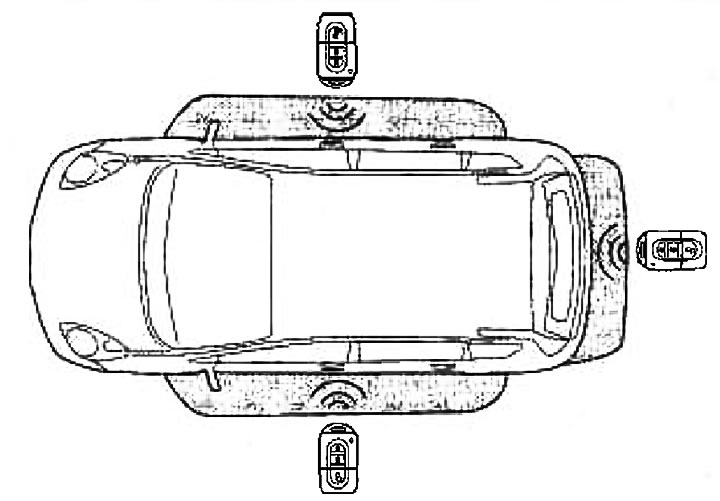
System "Intelligent Key" provides the car owner with additional convenience, allowing the car to be used without a traditional key.
Locking and unlocking locks
System "Intelligent Key" allows you to lock and unlock the driver's door, passenger doors or rear door without using the built-in remote control or spare key.
When approaching the vehicle within the grey zone (see fig.), the remote control "Intelligent Key" sends a unique code signal that allows the owner to manually lock or unlock the driver's door, passenger doors or rear door by pressing the switches on the door handles
Locking doors
- 1. When leaving the car, make sure that the remote control "Intelligent Key" is with you
- 2. Close all doors
- 3. Press the lock switch in the side door or rear door handle
- All doors will be locked
- The hazard warning light will flash once
Warning: All door locks will be locked. To avoid disruption of the system's functioning algorithm, do not leave a duplicate remote control in the car "Intelligent Key".
Note: If the remote control "Intelligent Key" left in the car, then when you press the lock switch (in the handles of the side or rear doors) a buzzer sounds, alerting the owner that he has left the remote control "Intelligent Key" in the car.
Unlocking doors
Unlocking doors in normal mode:
Press the door release switch in the side or rear door handle.
- All doors are unlocked
- The hazard warning light will flash twice
Unlocking door locks in attack protection mode (Anti-Hijack):
- 1. Press the lock/unlock switch in the side or rear door handle
- Only the lock of this door will be unlocked
- The hazard warning indicator will flash twice at short intervals
- 2. Before the 5 seconds period has elapsed, press the lock/unlock switch in the side or rear door handle again
- All doors are unlocked
- The hazard warning indicator will flash twice with a long interval.
Information copied from the portal www.nissanbook.ru
Note: Pressing the passenger door lock/unlock switch unlocks all doors as in the normal door unlocking mode. Normal operation of the system "Intelligent Key" may be disrupted due to external factors. In such cases, use the spare key located in the remote control "Intelligent Key".
Attention:
- Make sure that the remote control battery and "Intelligent Key" was in working condition. It should be remembered that the service life of the battery depends on various factors, including the intensity of use, ambient temperature, etc.
- In the remote control "Intelligent Key" there is a miniature radio transmitter, the operation of which can be affected by metal objects located near it.
- Place the remote control "Intelligent Key" away from mobile phones, laptops and other electronic devices.
Starting the engine in the system "intelligent key"
For more information, see the section "Starting the engine and driving the car".
Caution: Before starting the engine and driving, make sure that the remote control "Intelligent Key" is with you. If the remote control "Intelligent Key" is located away from the passenger compartment, then the car engine will not be able to start.