


Table of contents: Information computer ↓ How to change odometer/trip counter…↓ Power reserve ↓ Average fuel consumption ↓ Average speed ↓ Travel time ↓ Reminder about the need for…↓ Oil level warning ↓ Outside air temperature ↓
See your computer's user manual.
Information computer
The computer displays the following parameters:
- Odometer readings
- Odometer readings A/B
- Power reserve
- Average fuel consumption
- Average speed
- Travel time
- Outside air temperature
How to change odometer/trip counter display
When you press the odometer/tripmeter button (1), the display mode changes as follows: Odometer → Tripmeter A → Tripmeter B → Driving range → Average fuel consumption → Average speed → Trip time → Outside temperature → Odometer.
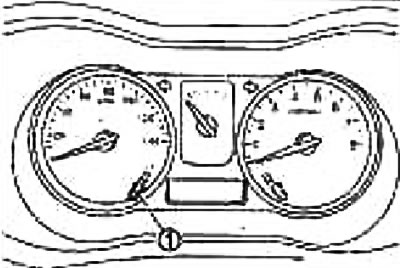
Note:
- When holding the button for more than 1 second in all modes (except for odometer, range and outside air temperature mode) the readings are reset.
- When you hold the button down for more than 3 seconds (the indicator flashes once) in every mode (except for odometer, trip meter A, range and outside air temperature mode) readings in all modes, except those mentioned, are reset simultaneously.
Power reserve
The elapsed time indicator informs the driver of the distance that can be traveled without refueling.
The range information is sent to the instrument cluster via the CAN bus. The range is calculated by the instrument cluster based on the fuel level sensor readings (remaining fuel), pulse signal of the ECM unit (fuel consumption signal) and vehicle speed signal.
Average fuel consumption
Information on average fuel consumption is sent to the instrument cluster via the CAN bus. Average fuel consumption is calculated by the instrument cluster based on the fuel consumption signal and the vehicle speed signal.
There are two types of indication: instantaneous consumption and average consumption.
After approximately 0.5 km and for 30 seconds after reset, the display shows "−−−".
Average speed
Calculated based on the distance traveled and travel time.
After approximately 0.5 km and for 30 seconds after reset, the display shows the indication.
Travel time
Calculated by the computer as the elapsed time since the last reset.
The countdown starts only when the ignition key is turned to the "ON" position.
Reminder about the need for maintenance (MOT)
Shows the distance to the next maintenance.
During the first 5 seconds after turning the ignition key to the "ON" position, the odometer displays the distance remaining until the next maintenance and the type of maintenance.
The interval can be changed.
Note: For setup operations, please refer to the owner's manual.
Oil level warning
The amount of oil is displayed on the display for 5-10 seconds after turning the ignition key to the "ON" position
The indication changes depending on the oil level.
Oil level LOW: "0----"
Oil level HIGH: "00000"
When the oil level drops below the limit level, the indicator flashes.
The article is located on the website nissanbook.ru
The instrument cluster measures the oil level by reading the signal from the oil level sensor.
Outside air temperature
Displayed when the ignition key is turned to the "ON" position.
When the outside temperature is below -30°C or above 60°C, the display only shows "- -" although it is working. This also indicates a malfunction.
When the outside temperature drops below freezing (approx. 3°C), the display shows the following: (low temperature warning):
- H°C to -30°C: "H°C" flashes;
- from -30°C to -40°C: "--°C" flashes;
- below -40°C or above 60°C: "--" flashes;
- above 40°C: low temperature warning is cancelled.
The instrument cluster reads the signal from the ambient air temperature sensor.