English
Русский
Български
Беларускі
Український
Српски
Hrvatski
Română
Polski
Slovenský
Magyar
Bookmark
Articles
Sitemap
Contacts
Search:
Almera
Maxima
Murano
Pathfinder
Patrol
Primera
Qashqai
Serena
Sunny
Teana
X-Trail
Others
Note 1
(2004-2013)
Micra 3
(2002-2010, petrol)
Home
Nissan
Micra 3
(2002-2010)
Electrical equipment
Equipment and devices
Removal and installation of trip computer and audio unit
Removal and installation of trip computer and audio unit
(Nissan Micra K12)
0
1. Remove the instrument panel center trim (see section
Removal and installation of the instrument panel and its components
).
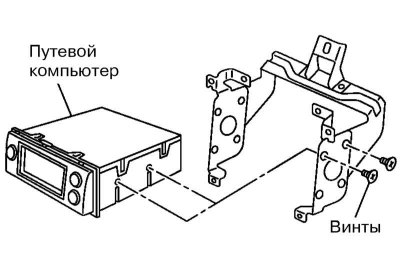
2. Remove the screws and remove the trip computer and audio unit assembly together with their bracket.
3. Remove the screws (on the side) and remove the trip computer or audio unit from the bracket.
This article is available at:
russian
,
bulgarian
,
belarusian
,
ukrainian
,
serbian
,
croatian
,
romanian
,
polish
,
slovak
,
hungarian
This article has been reviewed:
Sofia Shapovalova
Send this information to your friends:
◀ Previous
Micra 3: Equipment and devices
Next ▶
Instrument cluster
Removal, installation and adjustment of lighting fixtures
Replacement of lamps in lighting fixtures
Removal and installation headlight lens washer components
Removal and installation the rain sensor
Removal and installation speakers and antenna of the audio system
Removal and installation SRS system components
Similar information for other Nissan models
➜ Removal and installation the audio system head unit
Nissan Murano 1 (2002-2007, petrol)
➜ Checking the voltage at the engine control unit connector
Nissan Almera 1 (1995-2000)
➜ Removal the power unit from the car — preparation and…
Nissan Maxima 4 (1994-1999)
➜ Dismantling the power unit — safety measures
Nissan Terrano 1 (1986-1995, petrol)
➜ Audio system maintenance — removal and installation
Nissan Patrol 4 (1987-1997, petrol)
➜ Trip to the service station
Nissan Qashqai 1 (2006-2013)
Link in different formats to this article
TEXT
HTML
BB Code
Article about repairing Japanese cars Nissan Micra 3 (2002-2010): Removal and installation of trip computer and audio unit: https://www.nissanbook.ru/en/variant/Micra-K12/electrics/device/snyatie-i-ustanovka-putevogo-kompyutera-i-audiobloka
<a href="https://www.nissanbook.ru/en/variant/Micra-K12/electrics/device/snyatie-i-ustanovka-putevogo-kompyutera-i-audiobloka">Nissan Micra 3 (2002-2010): Removal and installation of trip computer and audio unit</a> - article on the website www.NissanBook.ru about Japanese car repair company Nissan.
[url=https://www.nissanbook.ru/en/variant/Micra-K12/electrics/device/snyatie-i-ustanovka-putevogo-kompyutera-i-audiobloka]Nissan Micra 3 (2002-2010): Removal and installation of trip computer and audio unit[/url] - article on the website www.NissanBook.ru about Japanese car repair company Nissan.
Comments and feedback from visitors
No comments yet
How much will 13 + 10 ?
Note 1
(2004-2013)
User manual
Control devices
Preparing to move
Starting engine and driving
Maintenance
Technical information
Power unit
Engine repair CR
Engine repair HR
Engine lubrication system
Cooling system (CR)
Cooling system (HR)
Fuel and exhaust system
Engine management (CR)
Engine management (HR)
Transmission
Clutch
Mechanical gearbox
Automatic gearbox
Drive shafts and axles
Chassis
Car suspension
Brake system
Steering
Body
Airbags (SRS)
Doors, hood and locks
Glasses and mirrors
Exterior (external elements)
Interior (internal elements)
Air conditioning automatic
Electrical equipment
Equipment and devices
Launch and charge system
Headlights and lighting
Windshield wipers and washers
Micra 3
(2002-2010, petrol)
General information
Introduction to guide
Governing bodies
Starting engine and driving
Maintenance
Power unit
Engine repair
Cooling system
Heating and ventilation
Power and exhaust system
Ignition system
Charge and launch systems
Transmission
Mechanical gearbox
Automatic gearbox
Clutch
Drive shafts and hubs
Chassis
Brake system
Car suspension
Steering
Body
Exterior (external elements)
Interior (internal elements)
Electrical equipment
Equipment and devices
Electrical circuits
Cookies are used to improve the site's performance. 💻 Continue by agreeing to the terms.
Continue