


Table of contents: Main Switch Panel ↓ Locking the window lifters on the…↓ Switch on the passenger door ↓ Automatic mode ↓
Main Switch Panel
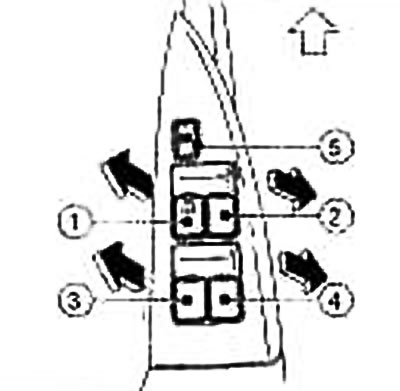
① — Driver's door window switch
② — Front passenger door window switch
③ — Left rear passenger door window switch (if any)
④ — Right rear passenger door window switch (if any)
⑤ — Passenger door window lock button
The illustration shown applies to left-hand drive models.
On the main switch panel on the driver's door armrest are switches ②, ③ and ④ for opening or closing the passenger windows.
To open the window, you need to press the switch down and hold it down. To close the window, you need to pull the switch up and hold it in this position. To stop the glass from moving in any direction, you just need to release the switch.
Locking the window lifters on the passenger doors
If you press the lock button ⑤, only the window lifter on the driver's door will work. To cancel the lock, you need to press the switch again.
Switch on the passenger door
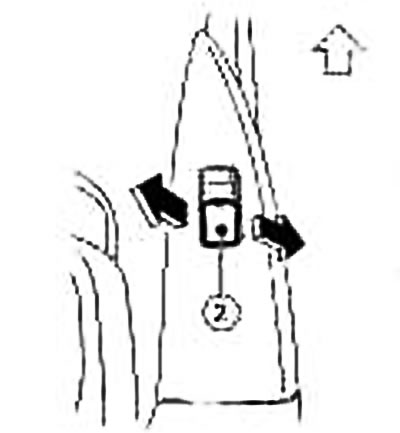
② — Front passenger door window switch
(The text was borrowed from here Nissanbook.ru)
To open the window, you need to press the switch down and hold it down. To close the window, you need to pull the switch up and hold it in this position. To stop the glass from moving in any direction, you just need to release the switch.
Automatic mode
To fully lower the driver's door window, press switch ① until it moves to the second position (overcoming noticeable resistance) and release immediately. The glass will automatically lower to the bottom position. To stop the glass, lift the switch up while the glass is moving.
To fully raise the driver's door window, pull the switch ① up until it moves to the second position (overcoming noticeable resistance) and release immediately. The glass will automatically rise to the upper position. To stop the glass, press the switch while the glass is moving.