


Headlight switch
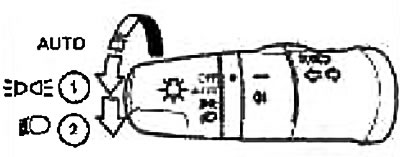
Outdoor Lighting
1. Turn the switch to
 position. Front and rear position lights, license plate lights and instrument cluster lights come on.
2. Turn the switch to the
 position. The headlights will turn on and the rest of the lights will remain on.
Caution: Do not leave exterior lights on for extended periods of time when the engine is not running.
Automatic lighting system (if available)
This system provides automatic switching on and off of outdoor lighting devices. The system can perform the following functions:
- Automatic switching on of headlights, front and rear marker lights, license plate lights and instrument cluster lights when natural light is reduced.
- Automatic switching off of the specified lighting devices when natural light improves.
1) Turn the light switch to the AUTO position. 2) Turn the ignition switch to the ON position.
To turn off the auto light system, turn the light switch to OFF,
① or ②.
Daylight mode (if available)
Even if the headlight switch is left in the off position, the following lights are automatically turned on after the engine is started: dipped beam headlights, front and rear position lights, license plate light, and instrument cluster light. In this case, however, it is not possible to switch from low beam to high beam.
If you turn the headlight switch to the
position, the low beam headlights will turn off.
Switching on high beam headlights
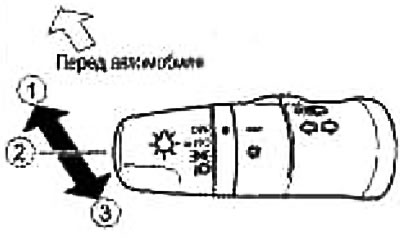
- 1. To turn on the high beam, you need to push the switch lever forward when it is in the position. Simultaneously with the high beam on, the high beam indicator will light up,
- 2. To switch to low beam, you need to return the lever to yourself (to position ).
- 3. If you pull the lever further towards you, the high beam will turn on, even if the switch is in the off position.
Turn signal switch
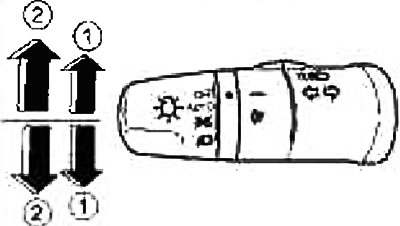
Lane change alarm
For Lane Change Warning, press up or down ① the shift lever until the direction indicators start flashing
Turn indicator
Move the lever up or down ② for right or left turn warning. After the turn is completed, the lever automatically returns to its original position
Headlight off timer (if available)
This feature is provided for your convenience. You can use the headlights for a while even after the ignition key or switch has been turned to the LOCK position. Pulling the lever towards you once will keep the headlights on for about 30 seconds. The headlights then turn off automatically. The lever can be pulled out up to four times and the duration of the headlights on can be extended up to 2 minutes.
Note: The headlight timer function is canceled when the key or ignition switch is turned to the Ac or ON position.
Power saving function (if available)
The energy saver function prevents the battery from being drained if you leave the vehicle with the exterior lights, spotlights, or interior lights on (switch is in position
or ) The function works when the ignition switch is in the OFF or LOCK position.
Note: When the ignition is switched on again, the exterior lights, local lights or dome light will turn on again.
Energy saving function for outdoor lighting fixtures (if available)
If, after turning off the ignition, the exterior lights are accidentally left on, they will automatically turn off when the driver's side door is opened. It is possible to leave the exterior lights on permanently by using the headlight switch when the ignition switch is in the LOCK or OFF position. In this case, when the driver's side door is opened, a warning chime will sound.
Energy saving function for interior lighting (if available)
Interior lighting switches off automatically after approx. after 15 minutes, if it was left on due to forgetfulness.