


Table of contents: Speedometer ↓ Tachometer ↓ Fuel tank indicator ↓ Odometer/trip counter for two trips ↓ Odometer. Trip counter for two trips ↓ On-board computer (if any) ↓ Fuel range (→o) ↓ Average fuel consumption (l/100km) ↓ Average vehicle speed (km/h) ↓ Travel time ↓ Reset all readings of the trip…↓ Outside air temperature indicator…↓ Low outside temperature warning ↓ Oil change indicator (if any) ↓ Oil level indicator (models with…↓ Setting the Oil Change Indicator ↓ Digital display watch ↓ 12/24 format selection Ⓑ ↓ Setting the time in the hour digit Ⓑ ↓ Setting time in minutes digits Ⓑ ↓ Resetting readings in seconds digits ↓
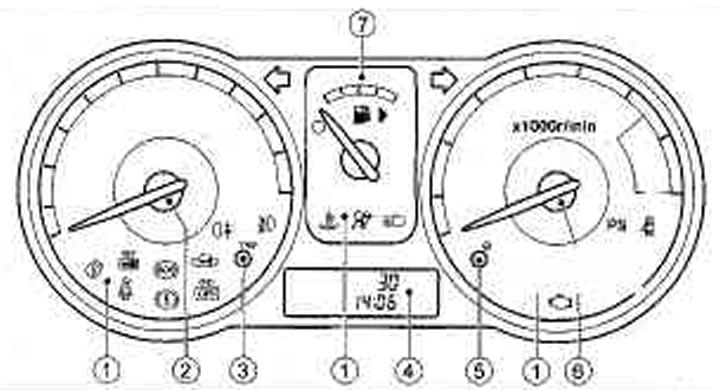
1. Control lamps and indicators; 2. Speedometer; 3. Counter reset button; mileage/on-board computer switch*,; 4. Display: clock, odometer, trip meter, trip computer, outside air temperature indicator, oil change mileage indicator*; 5. Oil change odometer reset button/clock setting button; 6. Tachometer; 7. Fuel level indicator
* if any
Speedometer
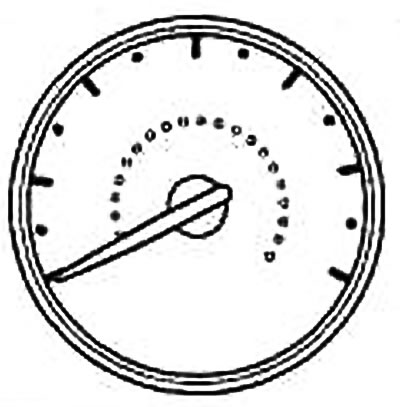
The speedometer is designed to indicate the speed of the vehicle (km/h or miles/h). The scale of the scale depends on the vehicle version.
Tachometer
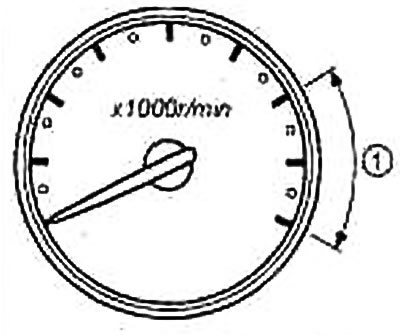
The tachometer shows the engine speed (min⁻¹) Do not allow the engine to run when the needle is in zone 1.
Caution: If the tachometer needle approaches the red zone of the scale, engage a higher gear. Running the engine when the tachometer needle is in the red zone may cause engine damage.
Fuel tank indicator
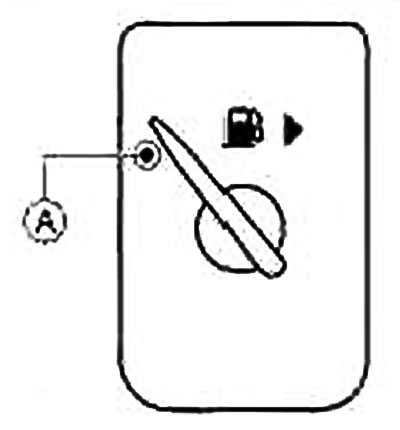
- When the engine is not running, the indicator needle is positioned at the minimum mark on the fuel level scale.
- The indicator needle may fluctuate slightly during braking, cornering, acceleration of the vehicle, and also when driving uphill or downhill.
- Icon D) >> indicates the location of the fuel filler cap on the right side of the vehicle,
- Ⓐ Critical fuel level indicator lamp in the tank
Note:
- Ⓐ critical fuel level indicator lamp lights up when there is a small amount of fuel left in the tank. If possible, fill the tank before the pointer drops to the bottom of the scale. The bottom position of the pointer corresponds to the reserve fuel supply in the tank.
- To attract the driver's attention, the first illumination of the low fuel level indicator lamp Ⓐ is accompanied by a three-time warning sound.
Caution: Refuel before the fuel runs out.
Odometer/trip counter for two trips
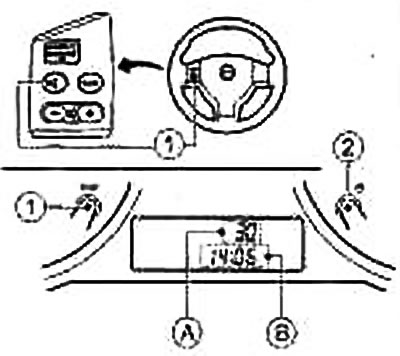
- ① Two-trip odometer switch/Trip computer switch*/Switch Ⓐ (information) on the steering wheel*
- ② Oil change mileage start switch/clock setting switch
- Ⓐ Total vehicle mileage (odometer)/mileage for one of two trips/trip computer display/outside temperature display
- Ⓑ Time indication
* if any
Note: The LCD information display only starts working after the ignition is turned on.
Odometer. Trip counter for two trips
The odometer displays the total mileage of the vehicle.
The trip meter displays the distance of one of the selected trips.
After turning on the ignition, the total mileage/trip mileage is displayed in the field Ⓐ
Switch display:
Press the trip odometer switch Ⓘ for two trips/TRIP switch of the trip computer (if any)/switch ⓘ (information) on the steering wheel to change the information in the order below: Total mileage → Mileage A → Mileage B → Trip computer modes (if any) → Outside temperature display → Total mileage
Resetting the trip odometer:
To reset the trip odometer while in Trip A or Trip B mode, press the trip odometer reset switch Ⓘ /TRIP switch on the trip computer (if any)/switch ⓘ) on the steering wheel (if any) and hold the switch down for at least 1 second.
On-board computer (if any)
With the ignition key in the ON position, you can enter the trip computer mode by pressing the Ⓘ TRIP button on the trip computer or the switch on the steering wheel remote control (ⓘ button) (if any). You can select the following on-board computer readings:
- Fuel range
- Average fuel consumption
- Average speed of movement
- Duration of the trip
Fuel range (→o)
You can find out the approximate distance in kilometers that the car can travel on the fuel remaining in the tank. This indicator is calculated continuously taking into account the amount of fuel in the tank and the actual fuel consumption.
A low fuel warning function is provided: if there is little fuel left in the tank, the mileage to the next refuelling is automatically displayed on the display, and the message symbols flash to attract the driver's attention. If you want to return to the mode that was activated before the low fuel warning, press the Ⓘ TRIP switch on the trip computer or the ⓘ switch on the steering wheel remote control. When the amount of fuel in the tank is extremely low, the symbols "_ _ _" are displayed on the display instead of the remaining mileage, and the icon (→o) continues to flash.
Average fuel consumption (l/100km)
Average fuel consumption is calculated for the period since the last reset of the counter. The displayed average fuel consumption can be updated by pressing the Ⓘ TRIP button on the trip computer or the ⓘ button on the steering wheel remote control (the duration of pressing the button is not less than 1 second).
Average vehicle speed (km/h)
The average speed is calculated for the period since the last reset of the counter. The displayed average speed can be updated by pressing the Ⓘ TRIP button on the trip computer or the ⓘ button on the steering wheel remote control (the duration of pressing the button is not less than 1 second).
Travel time
The travel time is calculated for the period since the last reset. The travel time displayed can be updated by pressing the Ⓘ TRIP button on the trip computer or the ⓘ button on the steering wheel remote control (the duration of pressing the button is not less than 1 second).
Reset all readings of the trip computer
To reset all trip computer readings except trip mileage A and fuel range, press the trip computer button Ⓘ or the button on the steering wheel control panel (button ⓘ). Hold the button down for at least 3 seconds.
Outside air temperature indicator (if any)
The outside temperature value (°C) is displayed in field Ⓐ of the display when the ignition key is in the ON position. A positive temperature value is not specifically indicated; a negative temperature value is preceded by a minus sign.
Low outside temperature warning
When the outside temperature drops below 4°C, the display starts flashing. The low temperature warning continues until the outside temperature rises above 4°C.
Oil change indicator (if any)
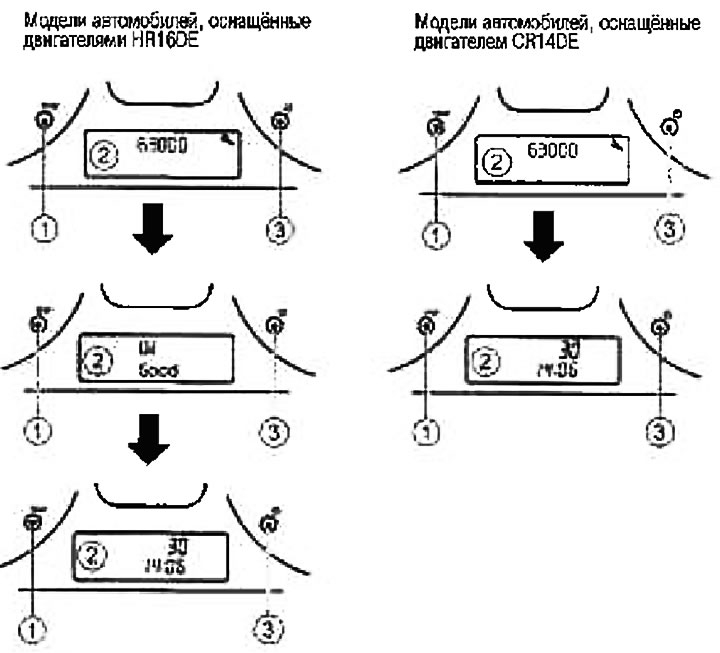
- 1. Trip computer button Ⓘ TRIP (or steering wheel panel switch ⓘ *)
- 2. LCD display
- 3. Oil change mileage start switch/clock setting switch
*if available
After turning on the ignition (ignition key in the ON position) the display shows a wrench image for 5 seconds and the mileage remaining until the next maintenance (before changing engine oil). Then the spanner icon and the mileage until the next service are replaced by the engine oil level indicator (for vehicles with HR16DE engines, see also the section "Engine oil pressure drop indicator light" below). Then the engine oil level indicator changes to the latest odometer/trip counter/trip computer data (if any)/outside air temperature that was displayed before the ignition key was turned to the ACC, OFF or LOCK position.
Oil level indicator (models with hr16de engine)
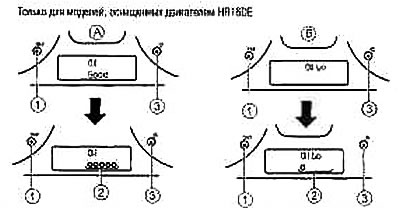
The indicator that appears on the display allows the driver to obtain information about the engine oil level.
When the engine oil level is sufficient Ⓐ the text "Oil Good" is displayed for 10 seconds (oil level is normal). If the oil level is low Ⓑ the display shows the text for 30 seconds "Oil L0" (low oil level), and this text flashes to attract the driver's attention. After briefly pressing the Ⓘ TRIP button on the on-board computer (or the ⓘ switch on the steering wheel panel, if available), the text "Oil Good" or " Oil L0" is replaced by a symbolic display of the oil level value ②.
For the oil change procedure, see also the section "Maintenance and DIY operations".
Setting the Oil Change Indicator
You can adjust the mileage remaining until the next engine oil change. To do this, press the ③ button of the clock / mileage indicator switch before maintenance and hold this button for three seconds or more while the wrench image and maintenance interval are displayed, the specified symbols on the display will flash, and the previously set interval will be displayed. Press the ③ buttonto increase the maintenance interval.
Each press increases the interval by 1000 km. The maximum possible maintenance interval is 63,000 km, after which it returns to zero.
If no further action is taken, the display shows "Oil" and the oil level display, confirming that the new oil change interval has been successfully set.
If you set the distance between oil changes to 0, the display will not show the distance remaining before the oil change and the wrench icon, but will directly show the status of the lubrication system ("Oil Good" or " Oil L0" on vehicles with the HR16DE engine). To return to the pre-oil change mileage display and the wrench image, press ③and hold the ③ button of the clock setting switch/pre-maintenance mileage indicator after switching on the ignition for three seconds or more and set the mileage value as described above.
Caution: Check the engine oil level regularly, at least every time you fill up with fuel. Insufficient oil will cause engine damage that will not be covered by warranty.
Digital display watch
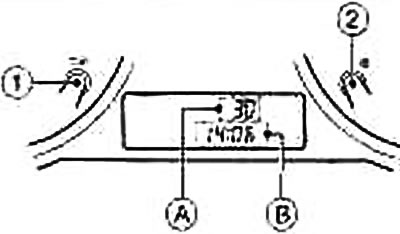
- ① Two-trip odometer switch/trip computer switch*
- ② Oil change mileage start switch*
- Ⓐ Total vehicle mileage (odometer)/mileage for one of two trips/trip computer display*/outside temperature display*
- Ⓑ Time indication
* if any
After turning on the ignition, the current time is displayed in the Ⓑ field of the display.
12/24 format selection Ⓑ
The 12-hour and 24-hour time display modes are switched by briefly pressing the setting button ②. It should be noted that if the clock displays 0:01 in the 24-hour format, then after switching to the 12-hour display format, the clock display will show 12:01 AM.
Setting the time in the hour digit Ⓑ
To switch the watch to the time setting mode, press and hold the setting button ② for at least three seconds. In this case, the images of the digits in the senior digits (hours), the separator (colon) and the symbols AM or PM (if the watch operates in 12-hour time display mode) will start to flash at a certain frequency. Each time you press the setting button ②, the clock readings change by 1 hour.
In the 12-hour display format, the AM or PM symbol lights up on the display, which alternate at noon and midnight. If the setting button ② is not pressed for 5 seconds, the watch will switch to the minute time setting mode.
Setting time in minutes digits Ⓑ
In this mode, the images of the digits in the least significant digits (minutes) and the separator (colon) flash at a certain frequency.
For short-term (no longer than one second) pressing button ②, the time display changes by 1 minute. When pressing for more than 1 second, the time display changes at a rate of 4 minutes per second. When pressing for more than 3 seconds, the time display changes at a rate of 8 minutes per second.
If the setting button ② is not pressed for 5 seconds, the watch will enter the time setting mode in seconds.
Resetting readings in seconds digits
Pressing the setting button ② resets the seconds digits (colon blinking).
If the setting button ② is not pressed within 60 seconds, the time display in the minute digits increases by 1 minute and the watch returns to normal operation.