


Table of contents: Description ↓ Description of the self-diagnostic…↓ Indication in self-diagnostic mode ↓ Output device numbers and their…↓
Description
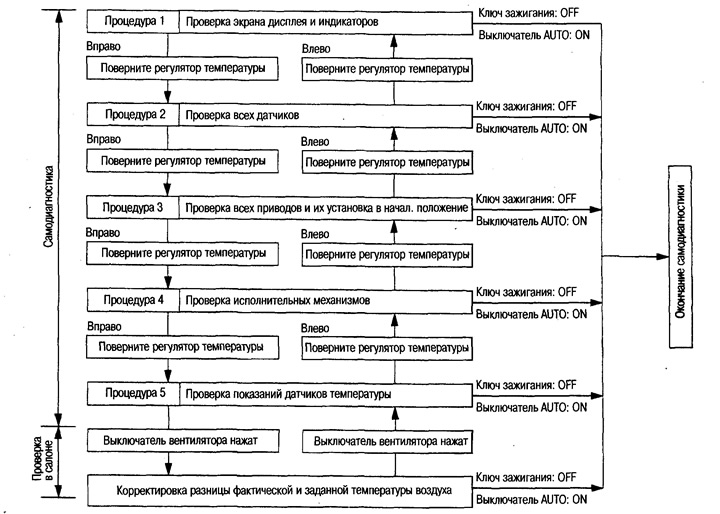
Self-diagnosis includes five procedures. Each of them issues control signals that check whether a particular sensor is faulty, and the operation can be checked using the corresponding actuator.
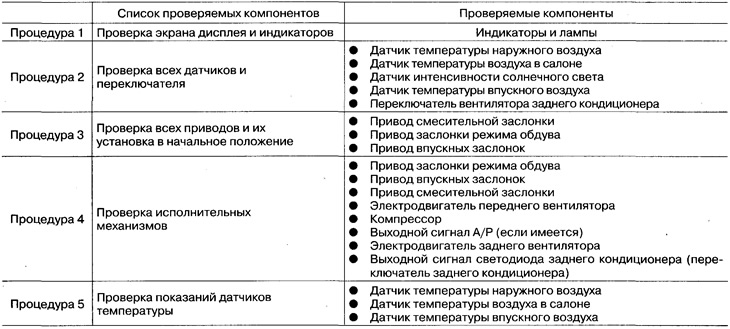
Description of the self-diagnostic mode operation
Switching to self-diagnosis mode
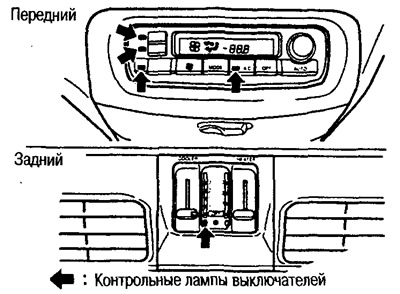
Set the rear air conditioner switch to the AUTO position.
Turn the temperature control all the way to the left.
Start the engine (turn the ignition key from the OFF position to the ON position) and press the air conditioner switch for at least 5 seconds. The switch must be pressed no later than 10 seconds after starting the engine, after which self-diagnosis procedure 1 starts.
Switching between self-diagnostic procedures
The transition from one diagnostic procedure to another (1-5) is carried out by turning the temperature regulator (HEAT) to the required position.
Turn the knob from left to right: procedures 1-5.
Turning the knob from right to left: Procedures 5-1.
Diagnostic content for each procedure: see section "Indication in self-diagnostic mode".
Completing self-diagnosis
Turn the ignition key to the OFF position.
Turn the AUTO switch to the ON position.
Indication in self-diagnostic mode
Procedure 1 - Checking the Display Screen and Indicators
The indicators of each switch and the indication on the LCD display are checked.
There are no faults: the indicators of each switch and the LCD display light up.
In case of a malfunction, the corresponding indicator does not flash.
Procedure 2 - Checking all sensors
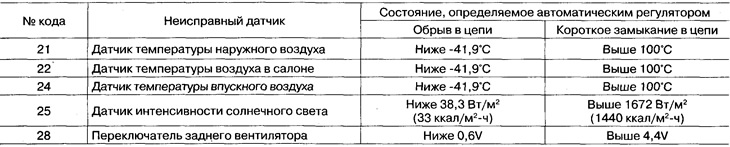
When moving to procedure 2, the display shows the number 2, after which the test results are displayed. The input signals from all sensors entering the automatic controller are checked. If all sensors are in good condition, the code "20" is displayed.
In case of a malfunction: the serial number of the faulty sensor flashes after the number "2". If there is a short circuit in the sensor circuit, the "-" sign lights up. In addition, when several sensors are faulty, the serial numbers flash alternately 2 times.
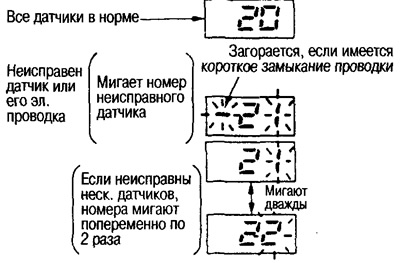
Error codes and sensor states recognized by the automatic regulator
Procedure 3 - Checking all actuators and resetting them to their initial position
When moving to procedure 3, the display shows number 3, followed by the test results.
The output signals of the intake and mixing flaps and the blower mode flap drives are checked.
If there are no faults, code "30" is displayed.
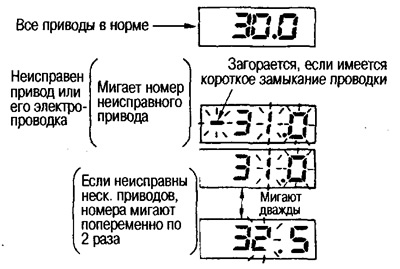
In case of malfunction: the drive number with the incorrect flap position flashes. In case of short circuit, the "-" indicator lights up. In addition, when several positions are incorrect, the serial numbers flash alternately 2 times.
To reset all actuators to their initial position, press the "DEF" switch. The code "30" is displayed and the "DEF" switch indicator flashes for approx. 10 seconds.
 |
 |
Indication of faulty drives

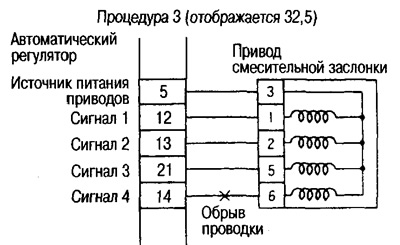
Indication of electrical wiring fault

Procedure 4 - Checking the actuators
When moving to procedure 4, the number 41 is displayed, and when the DEF switch is pressed, the indication changes as follows: 42 -> 43-> 44 -> 45 -> 46 -> 41. In addition, the output signal of the rear fan changes according to the position of the switch.
As shown in the table, the automatic controller forcibly adjusts each actuator, blower fan motor and compressor according to the displayed number. Check the operation of the damper by comparing its state by the sound of operation and touching the corresponding deflector with your hand.
Note: The working status of each drive, fan motor and compressor cannot be checked by the display.
Output device numbers and their states during testing
Front air conditioner
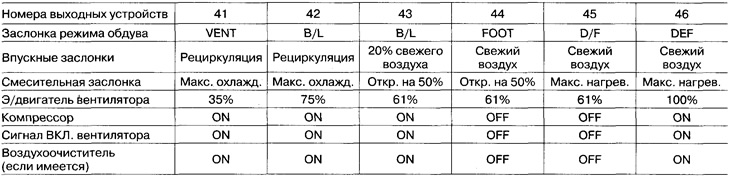
Rear air conditioner

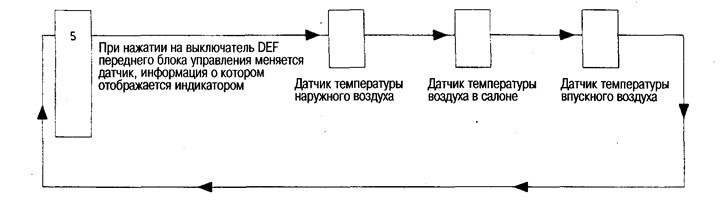
Procedure 5 - Checking Temperature Sensor Readings
When moving to procedure 5, the number 5 is displayed. Each time the DEF switch is pressed, the temperature sensor display changes with an accuracy of 0.5°C.
Correction of the difference between the actual and set air temperature
If the air temperature in the cabin differs from the set one, you can adjust the temperature readings. By pressing the fan switch, you can determine the difference between the set one (displayed on the display) and the actual temperature. To adjust, turn the temperature regulator. The possible adjustment range is from -3°C to +3°C in 0.5°C increments. If the difference between the set (displayed on the display) and the actual temperature is negative, "AUTO" is displayed.
Note: After disconnecting the battery or if the battery voltage drops below 9V, the above adjustment is erased from the memory.