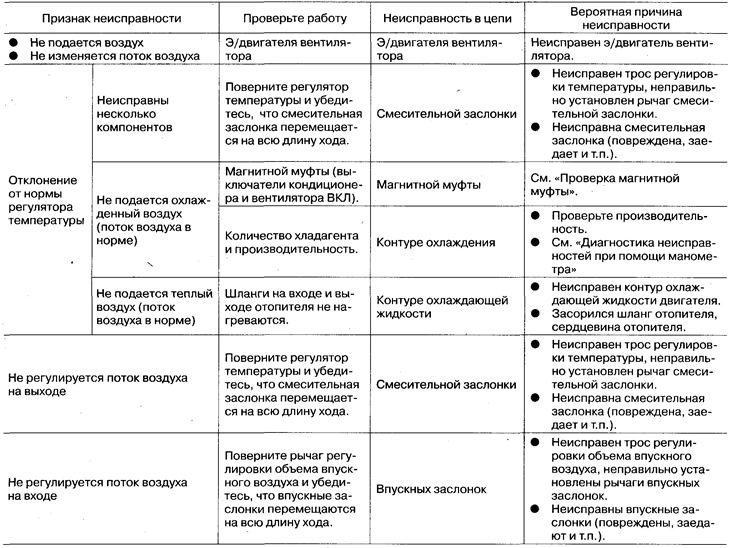
Table of contents: Checking the magnetic clutch system ↓ Checking the Fan Motor System ↓ Electrical diagram ↓ Diagnostics based on signs of…↓
Checking the magnetic clutch system
Checking the magnetic clutch
Disconnect the connector from the air conditioning compressor, check the operation of the compressor magnetic clutch by applying approximately 12V to the contacts.
Checking the air conditioner relay
Remove the air conditioner relay, check the sound of the relay operation by applying a voltage of approximately 12V between contacts No.1 and No.2.
Check if there is conductivity between contacts #3 and #5.
Checking the amount of refrigerant
Connect the pressure gauge to the vehicle's control valve.
Make sure the reading is on the low pressure side (pressure on the pressure gauge) above approx. 0.18 MPa (1.8 kg/cm²).
Checking the ECCS control unit
Start the engine, close contact #28 (models with SR engine) or #21 (models with YD engine) eCCS control unit to ground, check the operation of the magnetic clutch.
Checking the refrigerant pressure sensor (models with SR engine)
See ch. Engine management system.
Checking the hydraulic switch (models with YD engine)
Disconnect the connector from the hydraulic switch and check its conductivity.
Checking the thermal amplifier
Start the engine, close contact No.2 to ground, check the operation of the magnetic clutch.
Checking the air conditioner switch
Disconnect the connector from the regulator, check the conductivity between contacts No.3 and No.11.
Checking the Fan Motor System
Checking the front fan motor
Turn the ignition key to the ON position. Check that there is approximately 5V between terminal #3 of the electric motor intermediate wiring and ground.
Close contacts #3 and #4 of the electric motor and make sure it turns on. If it does not, repair the electric motor.
By changing the fan speed from 1 to 4, check the voltage between contact No.4 of the electric motor and ground.
- Speed 1: approx. 1.2V
- Speed 2: approx. 1.8V
- Speed 3: approx. 2.6V
- Speed 4: approx. 4.2V
If the volume of air being blown does not change, the electric motor is faulty. If the voltage does not change at different fan speeds, the fan switch or wiring is faulty.
Checking the Front Fan Switch
Disconnect the control unit wiring connector and check the resistance between terminals #7 and 9. If the resistance does not change, the switch is faulty.
- Speed 1: approx. 3.0 kΣ
- Speed 2: approx. 2.1 kΣ
- Speed 3: approx. 1.3 kΣ
- Speed 4: approx. 0 Σ
Checking the rear fan motor
Disconnect the rear fan connector. Short contact #12 of the electric motor to ground, check its operation by applying a voltage of approximately 12V to contact #1.
While changing the fan speed from LO (low) to HI (high), check the voltage between terminal #1 of the electric motor and ground.
- LO speed: approx. 4.5V
- M1 speed: approx. 8.0V
- HI speed: approx. 12V
If the voltage does not change, the rear fan switch or resistor is faulty.
Checking the rear fan switch
Disconnect the rear air conditioner wiring connector, remove the resistor. Check the continuity between the corresponding contacts. If there is no continuity, the switch is faulty.
- LO:3 (from the air conditioner side) -10 (from the resistor side)
- M1:3 (from the air conditioner side) - 9 (from the resistor side)
- HI: 3 (from the air conditioner side) -12 (from the resistor side)
Checking the rear fan resistor
Disconnect the connector from the resistor, check the conductivity and resistance between the corresponding contacts. If the resistance does not change, the resistor is faulty.
- 10-12 (LO): approx. 16.0Σ
- 9-12 (M1): approx. 3.1 Σ
Checking the fan relay
Remove the fan relay, check the relay operation sound by applying a voltage of approximately 12V between contacts No.1 and No.2.
Check if there is conductivity between contacts #3 and #5.
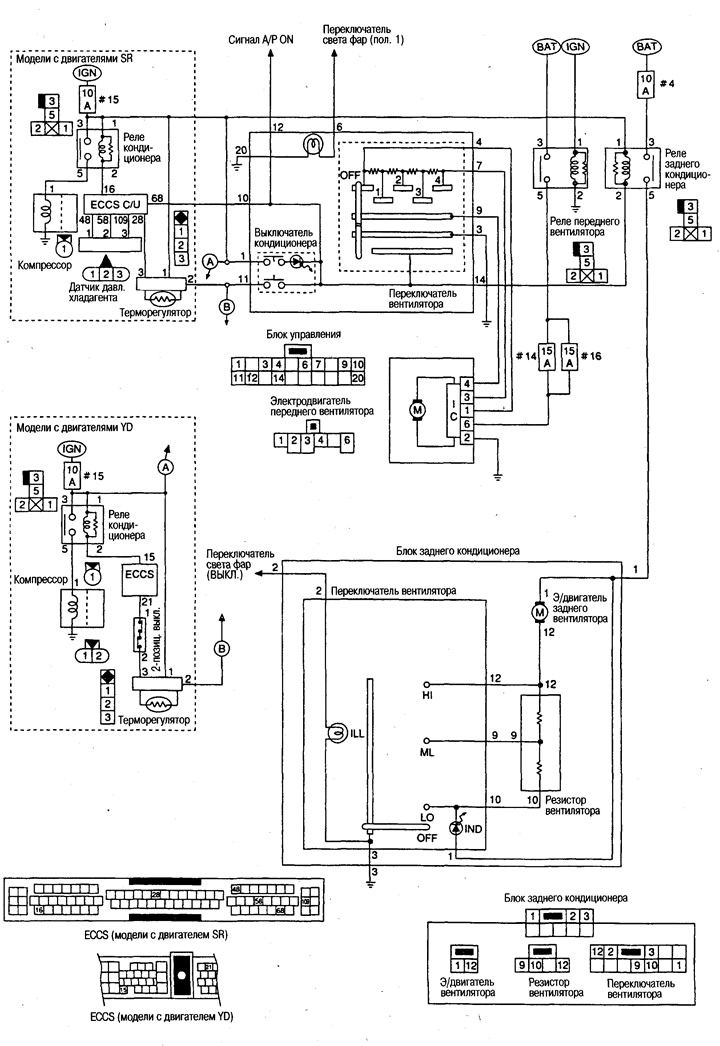
Electrical diagram
Diagnostics based on signs of malfunctions