


Table of contents: Manual transmission (MT) ↓ Automatic transmission (AT) ↓ Steering shaft lock ↓ Ignition Switch Handle Positions ↓ Using the emergency key "intelligent…↓ Anti-theft system NATS ↓
|
Cars with manual transmission
 |
Cars with automatic transmission
 |
The ignition switch includes an anti-theft steering lock.
The OFF position is between the LOCK and ACC positions. When the switch is turned to the OFF position, the steering wheel is not mechanically locked.
Attention:
- When operating the vehicle, check whether the remote control is with you "Intelligent Key".
- When leaving the car, do not leave the remote control in it "Intelligent Key".
- If the remote control "Intelligent Key" is located away from the passenger compartment, then the car engine will most likely be impossible to start.
Manual transmission (MT)
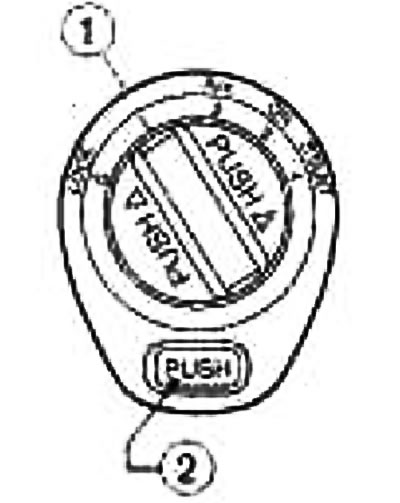
The ignition switch handle on vehicles with a manual transmission can be turned to the LOCK position only after pressing the "PUSH" button.
Note:
- If you turn the ignition switch knob to the OFF position, the indicator lamp
flashes and the buzzer sounds twice at the same time. Press the "PUSH" button ② and turn the ignition switch knob to the LOCK position. For more information on the operation of the ignition switch indicator lamp, refer to the "Instrument Panel and Controls" section.
- When using the spare emergency key, it is also necessary to press the "PUSH" button ② in order to turn the ignition switch to the LOCK position (blocking), although otherwise the indicator lamp does not flash and the buzzer does not sound.
Automatic transmission (AT)
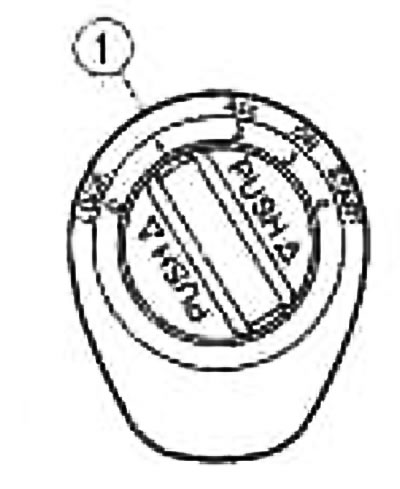
The ignition switch on vehicles with automatic transmission is designed in such a way that the ignition switch cannot be turned to the LOCK position unless the selector lever is first set to the P position. The selector lever can only be moved from the P position when the ignition switch is in the ON position and the brake pedal is depressed. If the ignition switch knob is turned to the OFF position, the indicator lamp flashes and the buzzer sounds twice. Check that the selector lever is in the P position, then turn the ignition switch to the LOCK position.
Steering shaft lock
Steering shaft lock
With the ignition switch in the LOCK position, turn the steering wheel 1/6 turn to the right, from the center position.
Removal the steering shaft lock
Press the brake pedal, turn the ignition switch knob to the ACC position, slightly rocking the steering wheel in both directions.
Ignition Switch Handle Positions
LOCK (normal parking position) (0) The steering shaft can only be locked in this position.
"OFF" (1). The engine can be switched off without locking the steering shaft.
ACC (power supply for additional electrical equipment) (2) This position provides power to additional electrical equipment, such as a radio, when the engine is not running.
ON (ignition on) (3) In this position, the ignition is turned on and power supply is provided to all consumers.
START (starter) (4) In this position, the starter is engaged to start the engine. After the engine starts, immediately release the switch handle, which will return to the ON position.
Using the emergency key "intelligent key" with a discharged battery
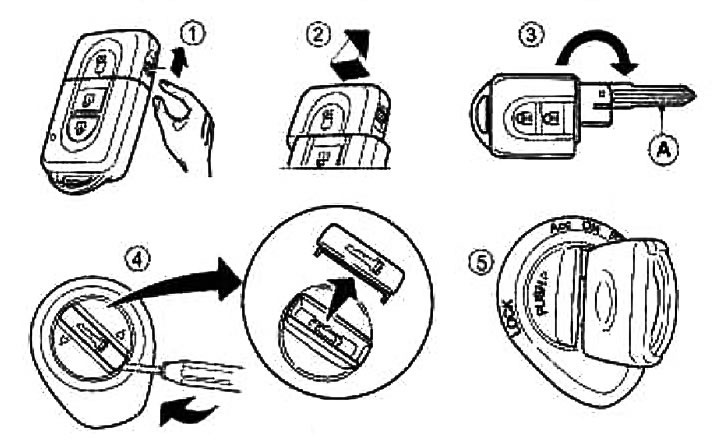
- 1. Slide the spare key cover lock
- 2. Remove the cover, see picture
- 3. Unfold the key Ⓐ
- 4. Using a handy tool, remove the cover of the cylinder opening
- 5. Insert the emergency key Ⓐ into the ignition switch as shown in the figure
- 6. Next, use the emergency key as described earlier in the section "Ignition Switch Handle"
If the ignition switch handle does not turn to the LOCK position on a car with an automatic transmission, then you need to do the following:
- 1. Slide the spare key cover lock
- 2. Remove the cover, see picture
- 3. Unfold the key Ⓐ
- 4. Using a handy tool, remove the cover of the cylinder opening,
- 5. Insert the emergency key Ⓐ into the ignition switch as shown in the figure
- 6. Set the selector lever to position P.
- Ⓐ slightly towards the ON position
- 8. Turn the emergency key to the LOCK position
- 9. Remove the emergency key Ⓐ
[See the source on the portal: NissanBook]
The selector lever cannot be moved from position P after the key has been removed from the ignition switch.
The selector lever can only be moved from position P when the ignition switch is in the ON position and the brake pedal is depressed.
Anti-theft system NATS
Immobilizer NATS (nISSAN anti-theft system) automatically blocks engine starting when attempting to start the engine without a programmed remote control "Intelligent Key".
If the engine does not start with the NATS key "Intelligent Key", turn the ignition switch knob to the LOCK position, wait five seconds, and then turn the ignition switch knob to the START position again to start the engine.