


Table of contents: Selector lever lock ↓ AT operating modes ↓ Overdrive Lock Button ↓ Automatic transmission emergency mode ↓ Recommendations for the use of AT ↓
AT is controlled by an electronic control unit. The AT mode selector lever is located at the bottom of the central console.
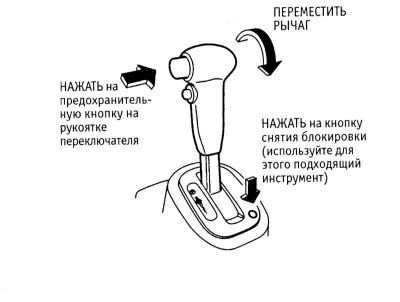
Removal the AT selector lever lock
AT has a function "kick-down" – downshifting with the accelerator pedal fully depressed if the AT is in "D" mode. This function is used to ensure maximum acceleration, for example when overtaking. After that, a shift to a higher gear occurs, unless the accelerator pedal is released before the maximum number of revolutions is reached.
Caution! When downshifting on a slippery road, there is a risk of skidding.
Selector lever lock
There is a large button on the side of the AT mode selector lever handle designed to prevent accidental switching of AT modes. Press the button to move the selector lever to the "P" and "R" positions, and also when switching from mode "2" to mode "1".
In addition, to move the lever from the "P" position to the drive position, you must press the brake pedal.
On some models, there is a selector lever release button to the right of the selector lever. If the selector lever cannot be moved out of the "P" position despite the ignition switch being in the "Acc" or "ON" position and the brake pedal being fully depressed, use this button. To do this, first make sure that the parking brake is engaged, then press the button and move the lever out of the "P" position. If this situation occurs, check the AT selector lever lock system as soon as possible.
AT operating modes
"P" (Parking) In this position, the AT is locked and the front wheels cannot rotate. Before moving the selector lever to this position, stop the car completely and press the lock release button; when parking on a slope, first apply the parking brake.
Warning! Moving the selector lever to the "P" position while the vehicle is moving will cause the front wheels to lock and the vehicle to lose control, and will also damage the automatic transmission. Do not use the "P" position instead of the parking brake - they must be used together.
"R" (Reversing) — This position of the AT selector lever is used for moving backwards.
Caution! To avoid damage to the transmission, make sure the vehicle is completely stopped before engaging reverse gear. After engaging "R" mode, wait for the gear to engage (you can feel it in the engine's thrust).
"N" (Neutral position) — The wheels and transmission are not locked, the car can be moved freely.
"D" (Movement) — Normal position of the selector lever when the vehicle is moving. The AT switches between all forward gears based on the optimal ratio of power and fuel economy.
"2" (Second gear) — AT switches only between gears 1 through 2. This is used to obtain more power when driving uphill, for engine braking when driving downhill, and to prevent frequent shifts from 2 to 3. Selecting this position also helps reduce wheel slippage on slippery roads. It is prohibited to engage mode "2" when driving at a speed above 100 km/h, as well as to drive in second gear at a speed higher than the specified one.
"1" (Low gear) — Set the selector lever to this position under heavy loads and when driving up a steep hill. Only 1st gear works in this mode. To engage mode "1", press the lock release button on the selector lever handle. Do not engage mode "1" when driving at speeds above 50 km/h, or drive in first gear at speeds above the specified speed.
Overdrive Lock Button
This button is located on the side of the AT mode selector lever handle, under the safety button. The button only functions when the "D" mode is selected.
Position "ON" (the button is in a recessed position) is used for normal driving conditions of the car. After the car accelerates to a certain speed, the AT will switch to the increasing stage.
Note: Upshift will not be engaged until the engine has reached normal operating temperature.
Position "OFF" is used when driving on long gentle slopes, when it is useful to brake with the engine. Press the upshift lock button so that the button comes out of the recessed position. In this case, switching to upshift will be blocked. When the upshift lock is activated, the corresponding K/L in the instrument cluster lights up.
Note: It is not recommended to drive at high speed for a long time with the overdrive lock engaged. Remember that this increases fuel consumption.
Automatic transmission emergency mode
When the AT switches to emergency mode, the next time the ignition key is turned to the "ON" position, the "O/D OFF" K/L will light for two seconds and then flash for approximately eight seconds. The vehicle can still be driven, but remember that in this case the AT will always be in third gear.
The AT may switch to emergency mode if the driving style is too active, when after intensive acceleration with slipping of the drive wheels there is sudden braking of the car. This happens even if all the electrical equipment of the AT is in perfect working order. To switch off the emergency mode, turn the ignition key to the "OFF" position, wait three seconds and then switch the ignition on again. If the emergency mode does not switch off, contact the authorized NISSAN representative for inspection and repair of the AT.
Recommendations for the use of AT
For start of movement select the driving mode and wait until the gear is engaged and the power flow reaches the front wheels (a slight jerk is felt). Only after this press the gas pedal.
At short-term stop, for example, at a traffic light, there is no need to select the "N" mode. It is enough to hold the car with the brake pedal. The engine, however, must be idling.
At parking when driving on a slope, you should first set the parking brake and then select the mode "P". This way the locking mechanism is not heavily loaded and the selector lever can then be easily moved out of this position.