


Table of contents: Preparatory work ↓ Removal and installation the lower…↓ Removal and installation the central…↓ Removal and installation the upper…↓ Removal and installation the TDC…↓ Installing the oil pan cover ↓ Installing the air conditioning…↓
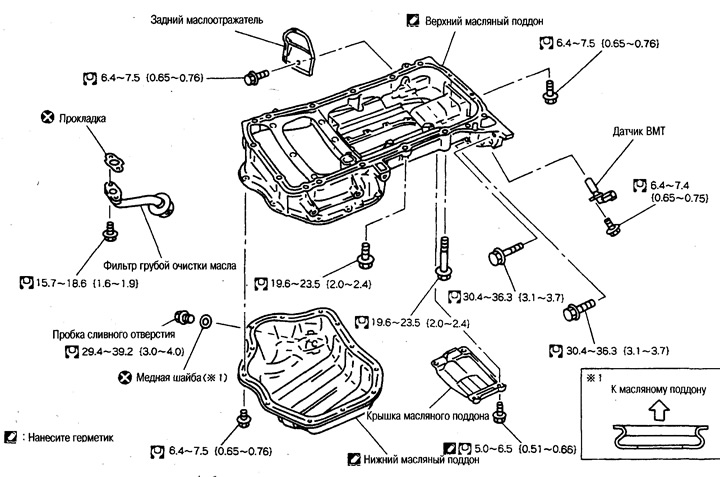
Preparatory work
(*: removing components from above)
Drain the engine oil.
Remove the engine protection from the bottom.
Remove the right mudguard.
Remove the front exhaust pipe.
Remove the rear catalytic converter diffuser.
Remove the air conditioning compressor bracket (item 6).
Remove the central support beam (item 2).
Remove the rear engine insulator bracket (2WD models).
Removal and installation the lower oil pan
Removal
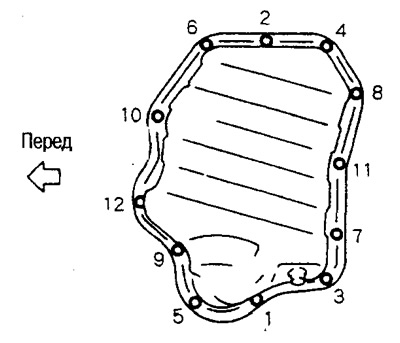
Loosen the mounting bolts in the reverse order shown in the illustration.
Remove the oil pan using a cutter (special tool).
Installation
Apply a continuous bead of Three Bond 1207C sealant (KR510 00150) to the places shown in the figure.
 |
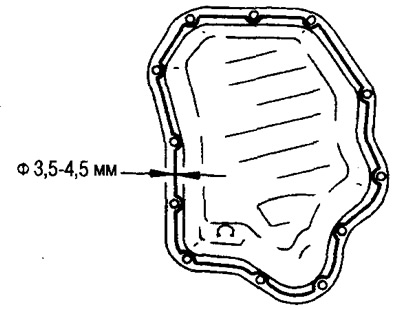 |
Tighten the mounting bolts in the order shown in the figure above.
Removal and installation the central support beam
Removal
Support the transmission oil pan with a jack.
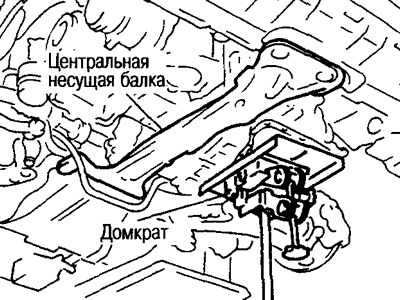
Note: Support as close to the center as possible.
Raise the engine and gearbox assembly and remove the rear end of the center support beam from the gap between the suspension beam and the stabilizer (4WD models).
Installation
Tighten all mounting bolts (see Engine Removal section).
After installation, check the vibration level of the engine mounts (see chapter "Active engine mounts").
(The source is published on the portal: NissanBook)
Removal and installation the upper oil pan
Removal
Loosen the mounting bolts in the reverse order to that shown in the figure.
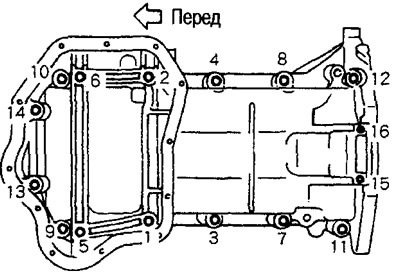
Caution: Be careful that bolts No.15, 16 do not fall into the gearbox.
Remove the upper oil pan using a cutter.
Installation
Apply a continuous bead of Three Bond 1207C sealant (KR510 00150) to the places shown in the figure.
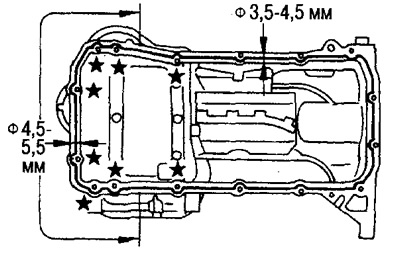
Attention:
In the 8 places marked with stars, the sealant is applied from the outside of the bolt hole.
The diameter of the sealant strip on the front side differs from the strip in other places.
Tighten the mounting bolts in the order shown in the figure above.
The lengths of the mounting bolts vary, so please refer to the bolt dimensions below when installing them.
- M8x25 mm: No.3, 4, 9, 10
- M8x60mm: №№1, 2, 5, 6, 7, 8, 11, 12, 13, 14
- Mbx30mm: No.15, 16
Note: Bolt lengths are given without head and guide part (the length of the threaded part is indicated).
Removal and installation the TDC sensor
Removal
Attention:
Be careful not to damage the sensor when removing it.
Do not store in areas exposed to metal particles.
Do not store in places where there is a magnetic field.
Installation
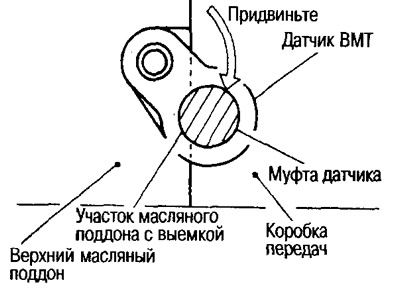
Tighten the set bolt, pressing the TDC sensor sleeve against the recess in the upper oil pan.
Installing the oil pan cover
If the set bolts are reused, remove the old sealant from the threaded portion, apply Three Bond screw Lock 1303B and tighten them.
Note: New bolts already have a locking compound applied, so no sealant is required.
Installing the air conditioning compressor bracket
Tighten the mounting bolts to 56.9-65.7 N·m (5.8-6.7 kg·m).
Caution: Before performing any work, disconnect the cable from the negative terminal of the battery.