


Note: Dampers, cables and their installation components are shown in the illustration Assembly of the K/V block of models with manual control. Cable drive is used only on models without automatic C/V.
Air supply flap
1. Remove the glove compartment cover (see Chapter Body).
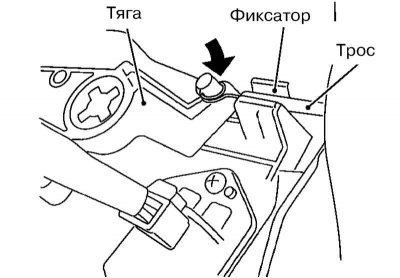
2. Release the air intake flap drive cable from the retainer.
3. Set the air supply control lever to the circulation position.
4. Press the air supply flap rod in the direction indicated by the arrow in the illustration, while simultaneously pulling the cable housing towards the ventilation system control unit and fixing it.
Note: When securing the cable housing, do not move the cable core.
5. Move the air supply control lever to ensure that it moves smoothly.
Air distribution mode selection flap
1. Remove the instrument panel pillar cover (see Chapter Body).
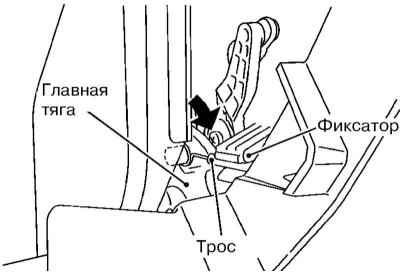
2. Release the air distribution mode selector flap drive cable from the retainer.
3. Set the mode selection handle to the ventilation position.
4. Press the main rod in the direction indicated by the arrow in the illustration, while simultaneously pulling the cable housing towards the ventilation control unit and locking it.
Note: When securing the cable housing, do not move the cable core.
4. Move the mode selection handle to ensure that the cable core moves smoothly.
Air mixing flap
1. Remove the instrument panel pillar cover (see Chapter Body).
[The source is published on the portal NissanBook.ru]
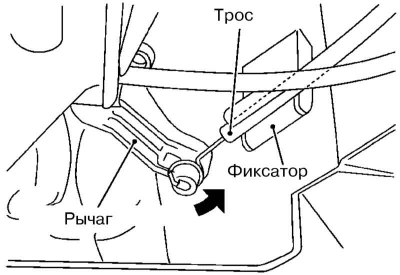
2. Release the air mix flap drive cable from the retainer.
3. Set the temperature control knob to the maximum cooling position.
4. Press the damper lever in the direction indicated by the arrow in the illustration, while simultaneously pulling the cable housing towards the ventilation control unit and locking it.
Note: When securing the cable housing, do not move the cable core.
5. Move the temperature control handle to ensure that the cable core moves smoothly.