


Table of contents: Removal ↓ Installation ↓
Removal
1. Remove the protective cover from the front right fender. See chapter Body.
2. Loosen the lock nut (A) of the tension pulley and adjust the belt tension by turning the adjusting bolt (B).
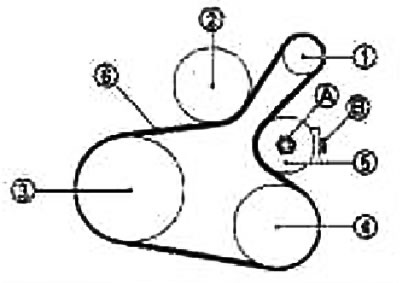
1. Generator; 2. Water pump; 3. Crankshaft pulley; 4. Air conditioning compressor (on models with air conditioning);Tension pulley (on models without air conditioning); 5. Tension pulley; 6. Drive belt
3. Remove the drive belt.
Installation
1. Press the tension pulley in the loosening direction and tighten the lock nut (A) by hand to the following torque: 4.4 N·m (0.45 kg·m)
[The publication is reprinted from this resource: NissanBook]
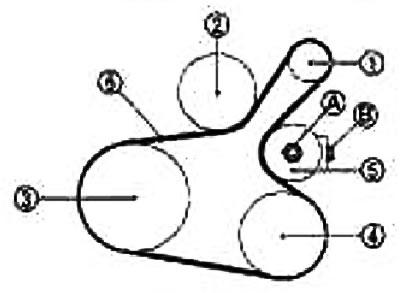
1. Generator; 2. Water pump; 3. Crankshaft pulley; 4. Air conditioning compressor (on models with air conditioning); Tension pulley (on models without air conditioning); 5. Tension pulley; 6. Drive belt
Note: Do not loosen the lock nut from the tightened position.
2. Place the drive belt on the pulleys.
Caution: Do not allow oil, grease or coolant to enter the pulley groove. When installing the belt, make sure it is seated correctly in the groove on each pulley.
3. Adjust the belt tension by turning the adjusting bolt (B). See section "Tension adjustment".
Caution: Adjust the belt tension while the lock nut is hand-tightened in step 1 so as to prevent the tension pulley from tilting. When measuring the belt tension immediately after installation, first adjust it to the standard value. Then rotate the crankshaft more than two revolutions and re-adjust to the standard value, eliminating the spread in the amount of belt deflection between the pulleys.
4. Tighten the lock nut (A)
Tightening torque: 34.8 N·m (3.5 kg·m)
5. Make sure that the belt tension is within normal limits.