


Table of contents: Removal ↓ Installation ↓
Removal
AT Mounting Components
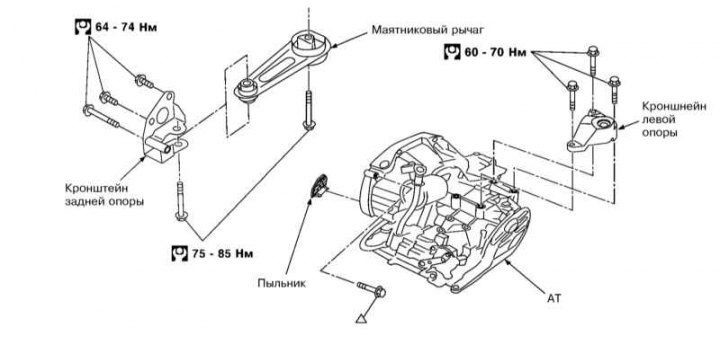
1. Remove the battery (see Chapter Engine electrical systems) and air duct (see Chapter Fuel and exhaust systems).
2. Remove the breather hose and CKP sensor (see section Operating principle of the engine management system).
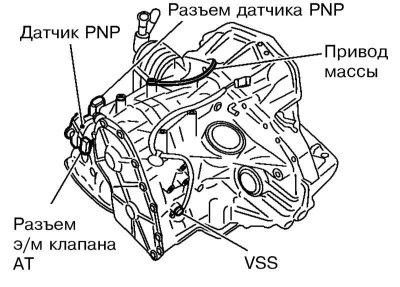
3. Disconnect the PNP sensor, solenoid, VSS sensor and ground wire.
4. Remove the selector cable from the AT.
5. Remove the front section of the exhaust pipe (see Chapter Fuel and exhaust systems).
6. Remove the drive shafts (see Chapter Drive shafts, steering knuckles and hub assemblies).
7. Remove the oil cooler hose.
8. Remove the starter (see Chapter Engine electrical systems).
9. Remove the dust cover from the torque converter housing (see illustration AT Mounting Components).
10. While turning the crankshaft, unscrew the 4 bolts securing the drive disk and torque converter.
11. Place the jack under the AT.
12. Remove the rear engine mount bracket and the pendulum arm, and also unscrew the bolts securing the AT to the left engine mount bracket (see Chapter Engine).
13. Place a jack under the engine.
14. Unscrew the bolts securing the AT to the engine and remove the AT.
Installation
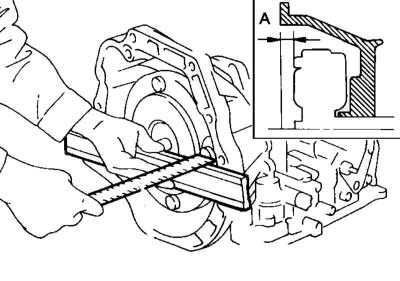
1. Make sure that the distance between the torque converter and the end of its housing is not less than 21.1 mm.
2. Install the torque converter on the drive disk and turn the crankshaft a few revolutions to ensure that the AT runs smoothly.
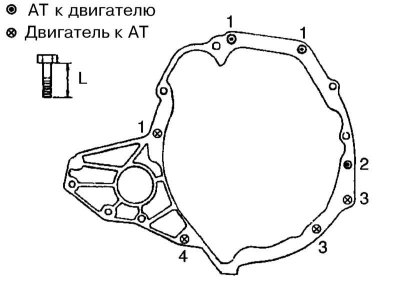
3. Tighten the AT mounting bolts: bolts No.1 (50 mm) and No.2 (135 mm) – with force 31÷40 Nm, and bolts No.3 (20 mm) and No.4 (30 mm) – with force 17÷23 Nm.
Note: The bolts are different lengths, do not mix them up.
4. Install all removed components.
5. After installation, adjust the selector cable (see section Adjusting the selector cable), adjust the ATF level and make sure there are no leaks. Check the correct operation of the AT.